A product of Acquisto Real Estate

One login for your entire real-estate business.

Not another app — a Total Real Estate Ecosystem. The MLS, your brokerage, and your association finally connected: your listings, your Transactions, your money, your paperwork, and an AI assistant that actually does the work.

One login for every hat you wear. Enter a fact once and PURE carries it to the places that need it.

Buying or selling a home with Acquisto Real Estate?
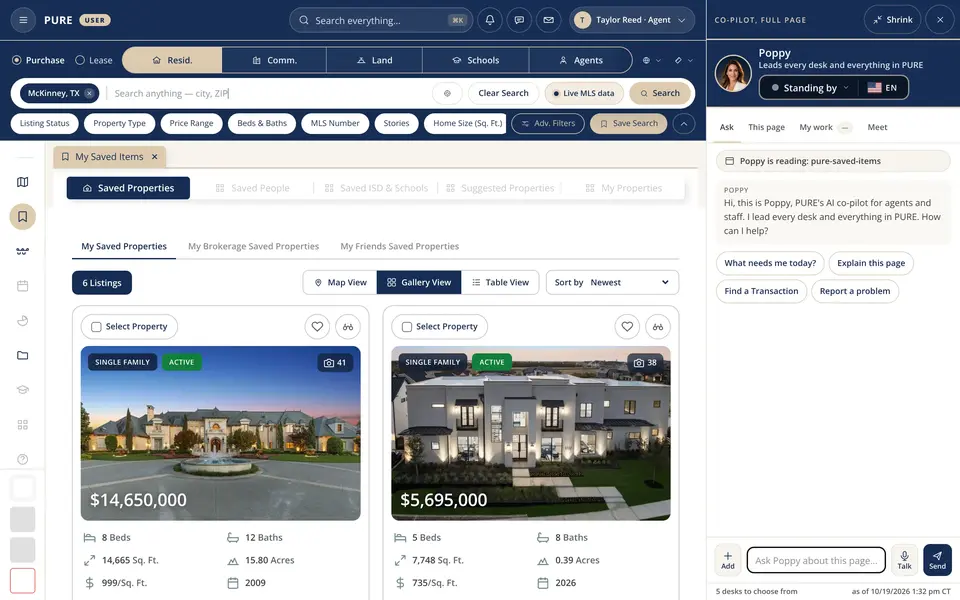
My Saved Items · Poppy The PURE user workspace with Poppy’s panel open: a My Saved Items tab with three luxury homes for sale in McKinney and Frisco in gallery view (a stone château-style estate on 15.8 acres, a modern white home lit at dusk and a large new home on a wide lawn), each card with its price, beds, baths, size, acres and year built, and Poppy’s panel on the right reading the page, with quick buttons What needs me today, Explain this page, Find a Transaction and Report a problem.
A real PURE screen, captured 10/16/2026. The homes are real listings for sale from the live MLS feed, saved in a demo account.

Watch PURE

Two short films, right here.

Press play to watch here, with captions on. The second film adds Poppy and Ginger, our AI assistants.

PURE Overview Everything a home sale needs in one place: the live MLS, district and HOA costs, pricing, listing, showings, Texas contracts, signing and closing.
Open the full page with chapters
PURE Overview with AI assistants The same tour with Poppy, Ginger and every desk showing their part, in Pure Meet and on the phone.
Open the full page with chapters

Live right now

Live from the running system.

Each figure is read from the running system when this page opens. A failed read shows a dash. Tiles with an arrow open the list.

See it working

Real screens from the running system.

Captured from PURE on 10/22/2026, grouped by what people ask for first. Tap a picture to enlarge it.

The map and listing screens show real homes for sale; every client name, address and amount is a sample.

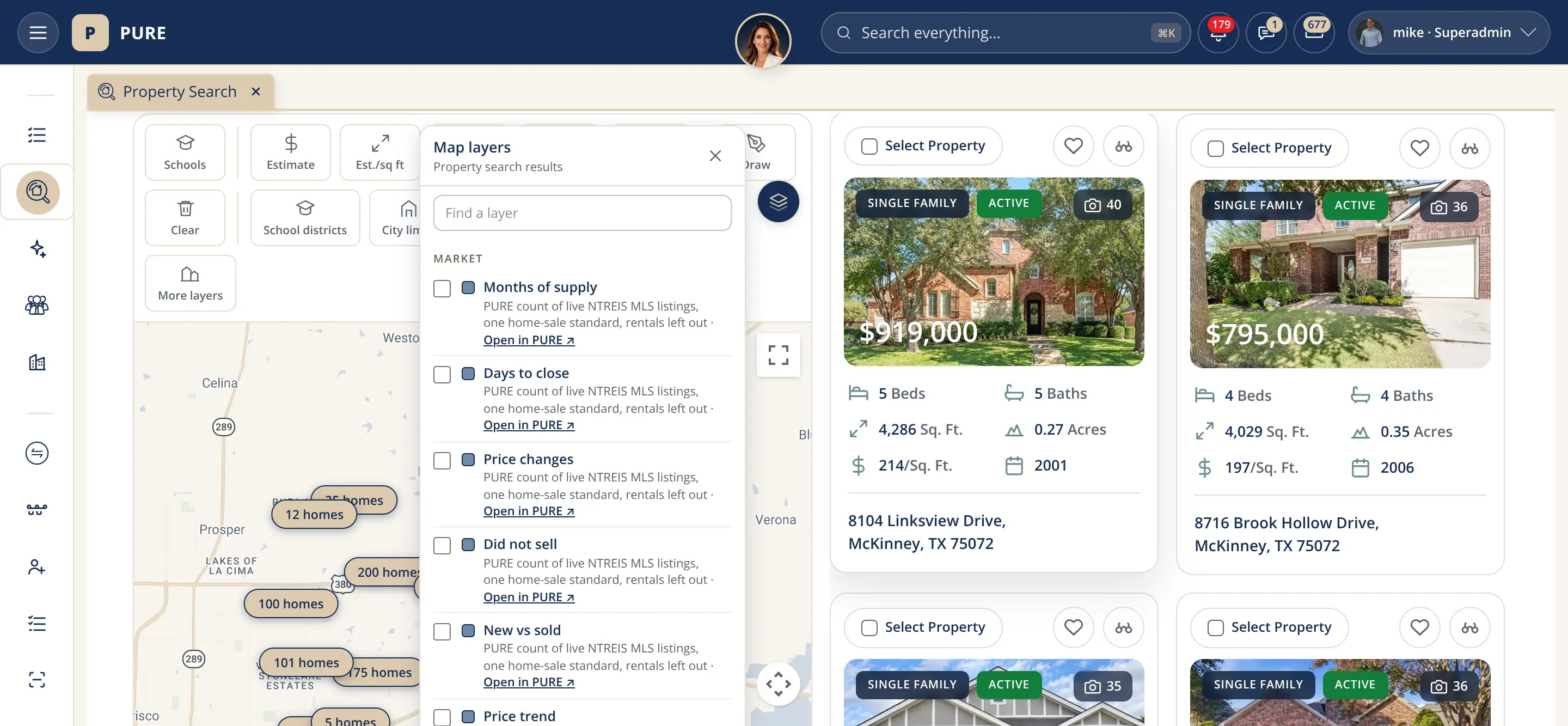
Maps

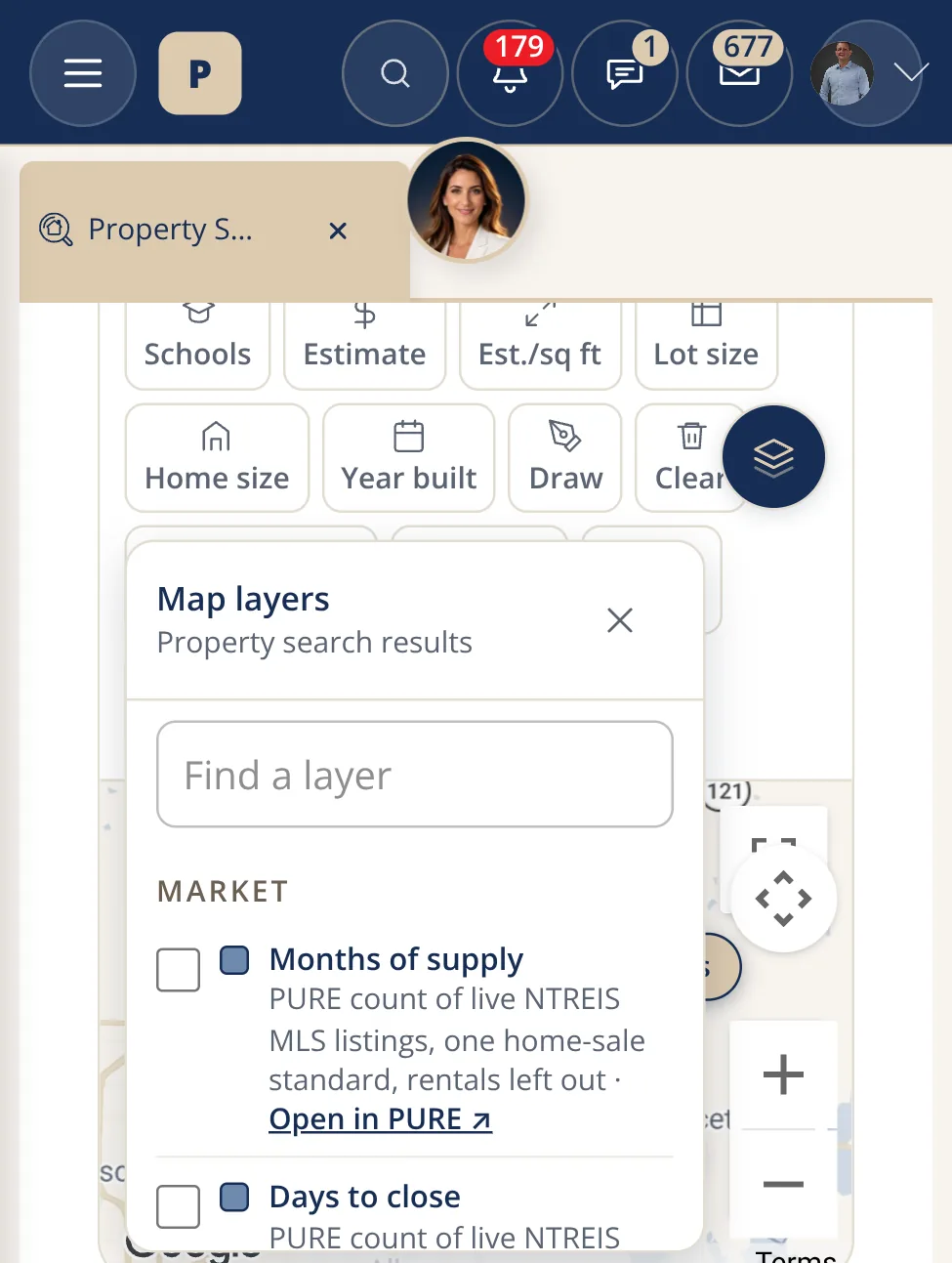
The PURE home search on a map, with the map layers panel open on the left listing months of supply, days to close, price changes and other layers, and two listing cards with price, beds, baths and size to the right.
Map layers. Search on the map and open the layer list: supply, days to close, price changes, schools, each dated.
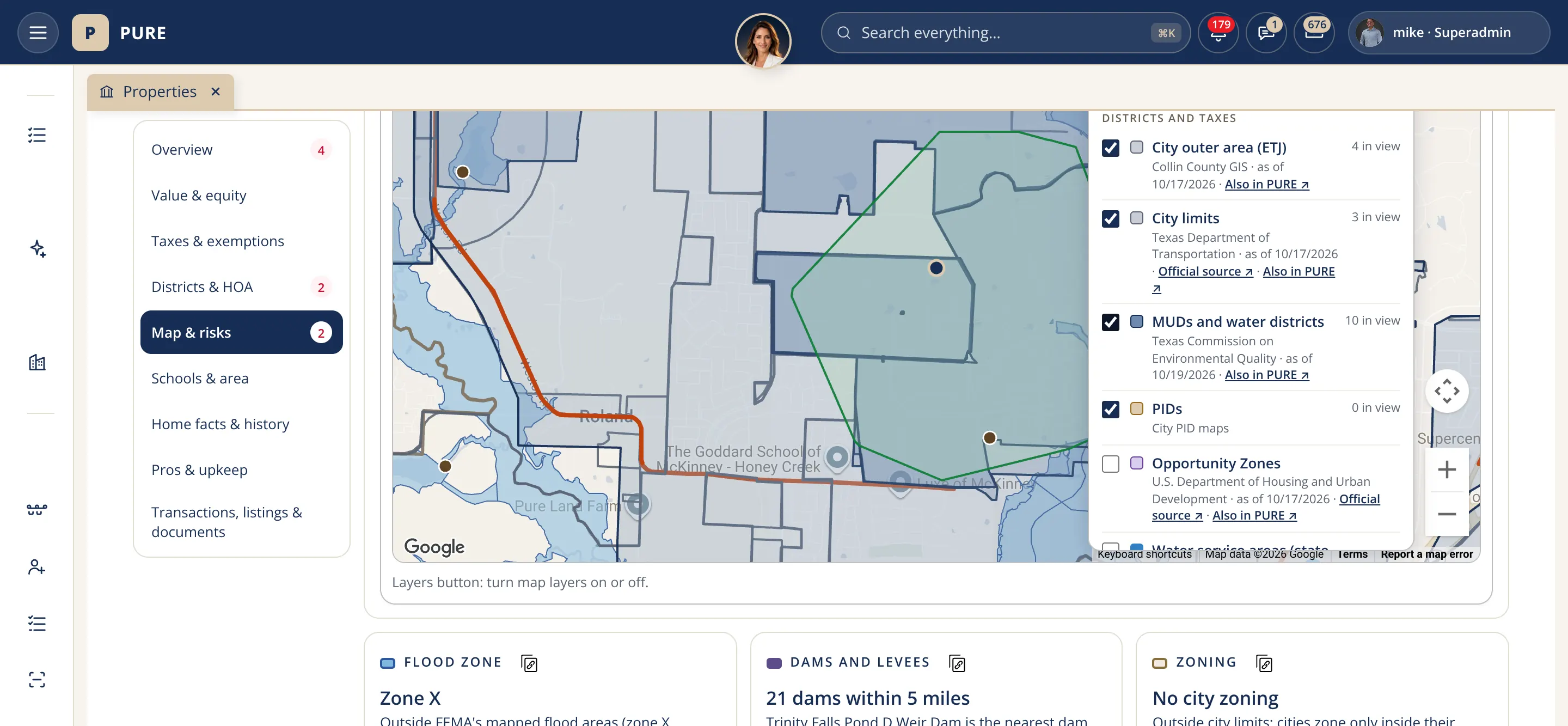
A property page's map with the city outer area, city limits, the water and utility districts and other boundaries drawn around the home, with the district list and its sources beside it.
Districts on the map. City limits, utility districts, flood zone and school district around a home, each with its source.
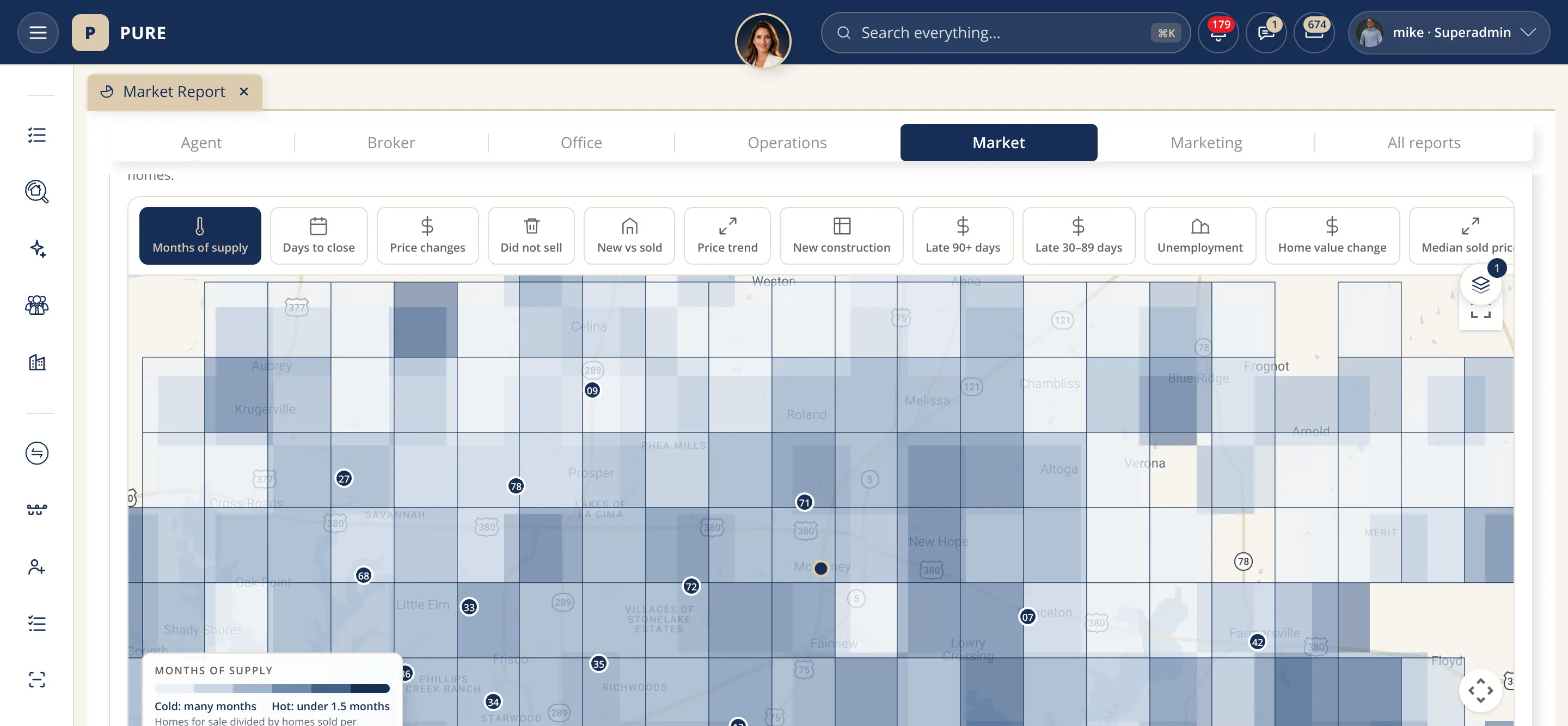
The Market report's county map of Texas shaded in blues by months of supply, with the report tabs above it and the layer buttons under it.
The market map. Every county shaded by months of supply, with late mortgages, price changes and sales a click away.

Tables and charts

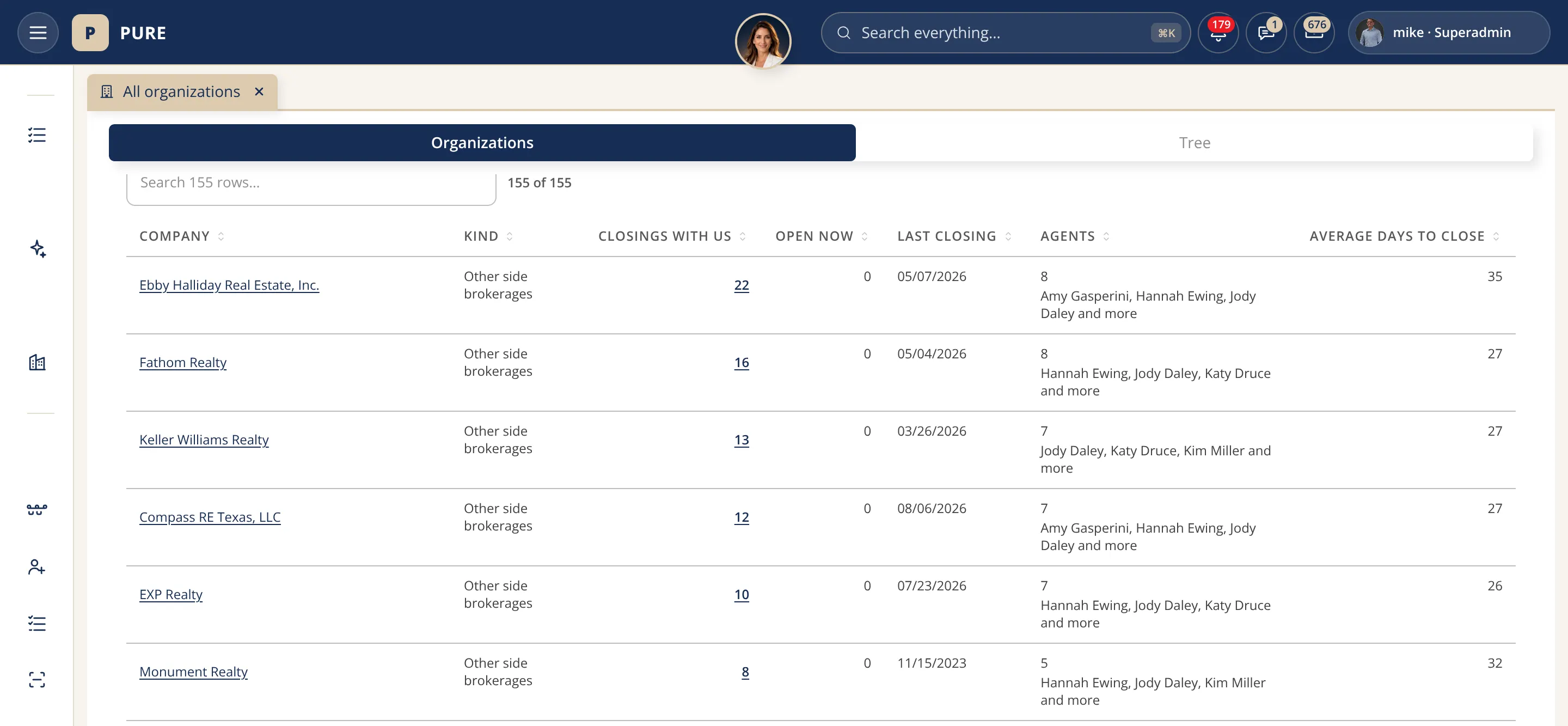
A table of other brokerages on closed Transactions with the columns company, kind, closings with us, open now, last closing and agents.
Who we close with. Every brokerage on a Transaction we closed: shared count, open now, last closing, their agents.
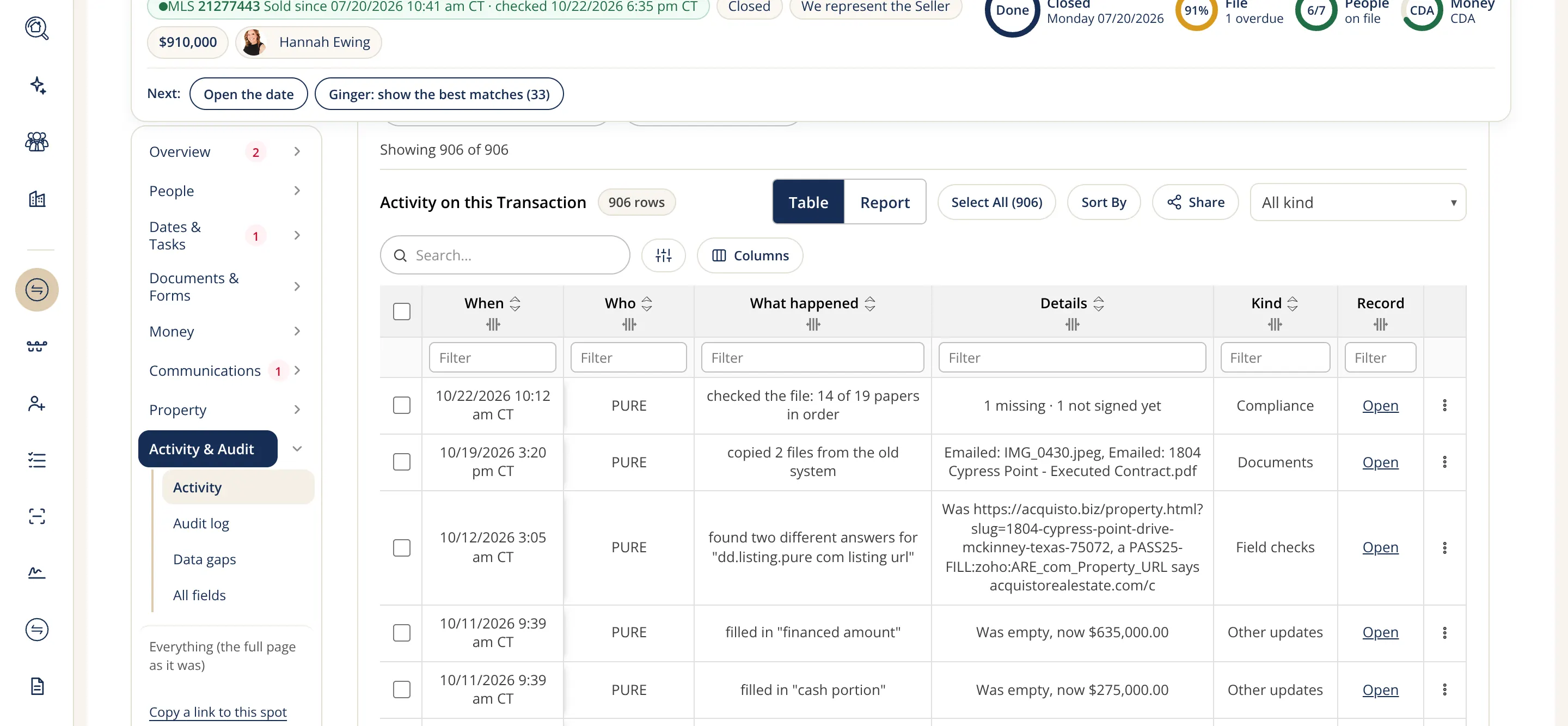
One Transaction's activity feed shown as a table with the columns when, who, what happened, details, kind and record, and a search box above it.
Activity, as a table. Everything that happened on one Transaction, who and when, filtered and searched by any column.
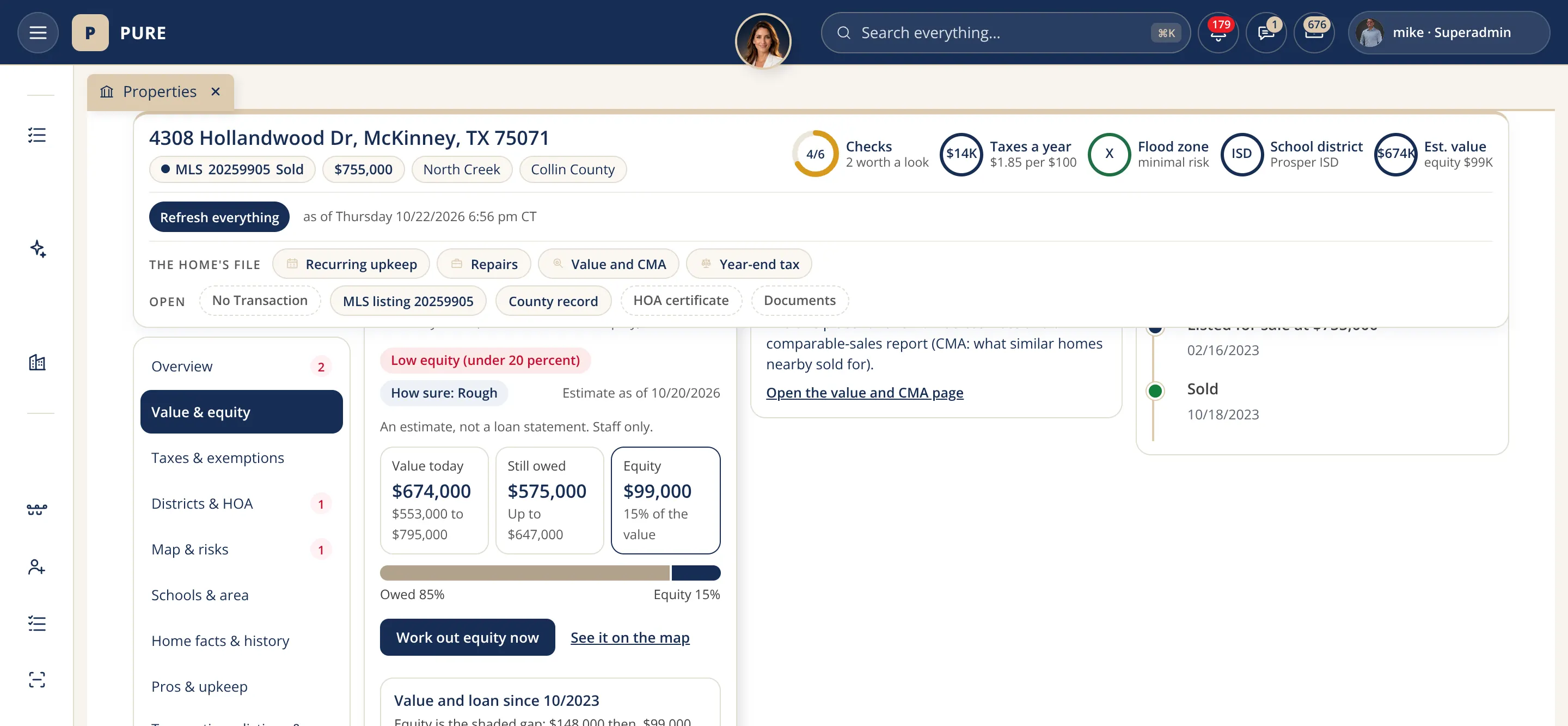
A property page's Value and equity card: the value, the loan and the equity in three boxes, a Work out equity button and the value and loan chart since the purchase.
Value and loan over time. The home's value and loan since purchase as two lines, so the owner's equity shows.
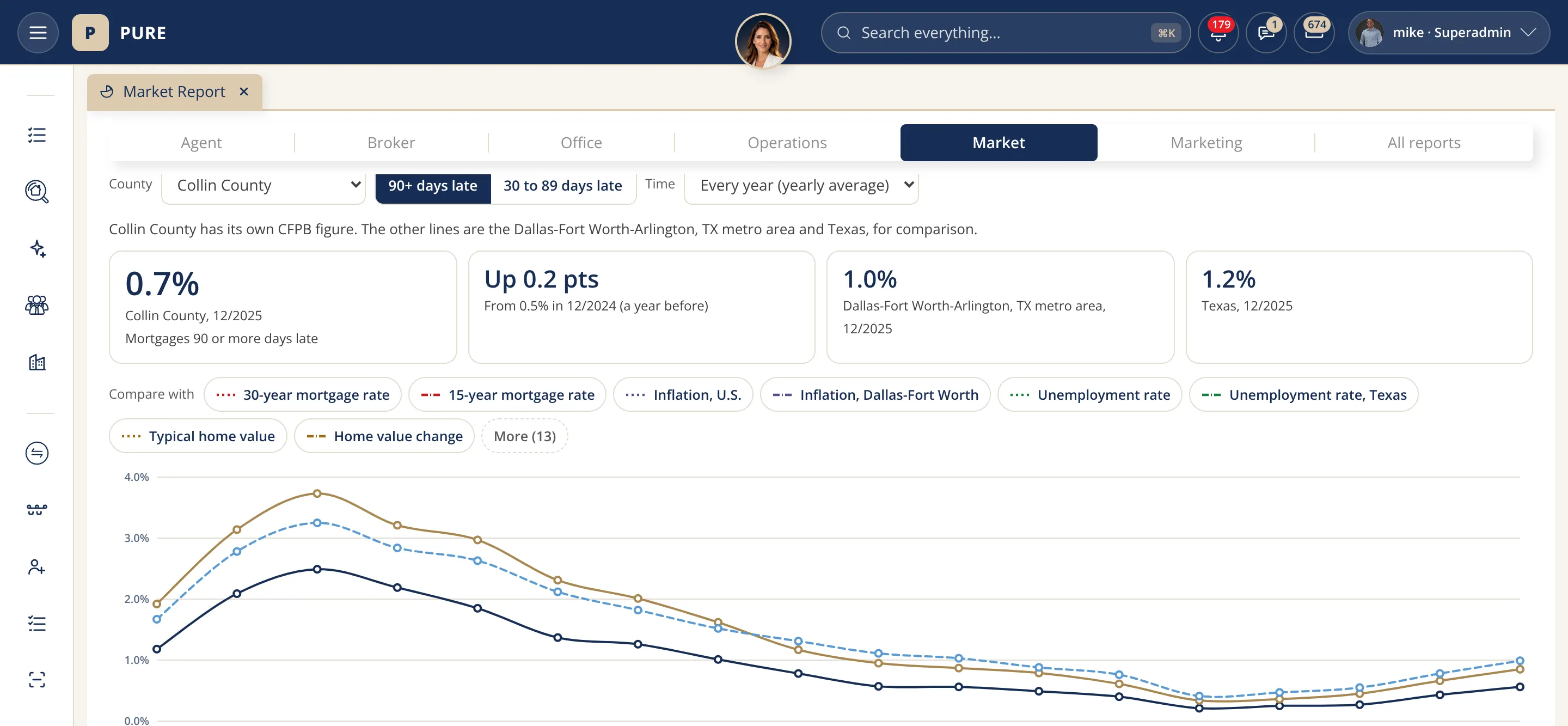
The Market report's late mortgages chart for Collin County with four summary boxes above it and a line chart comparing the county, Dallas-Fort Worth and Texas.
Late mortgages, compared. Loans 30 to 89 days late in Collin County beside Dallas-Fort Worth and Texas, rates laid over.

Reports

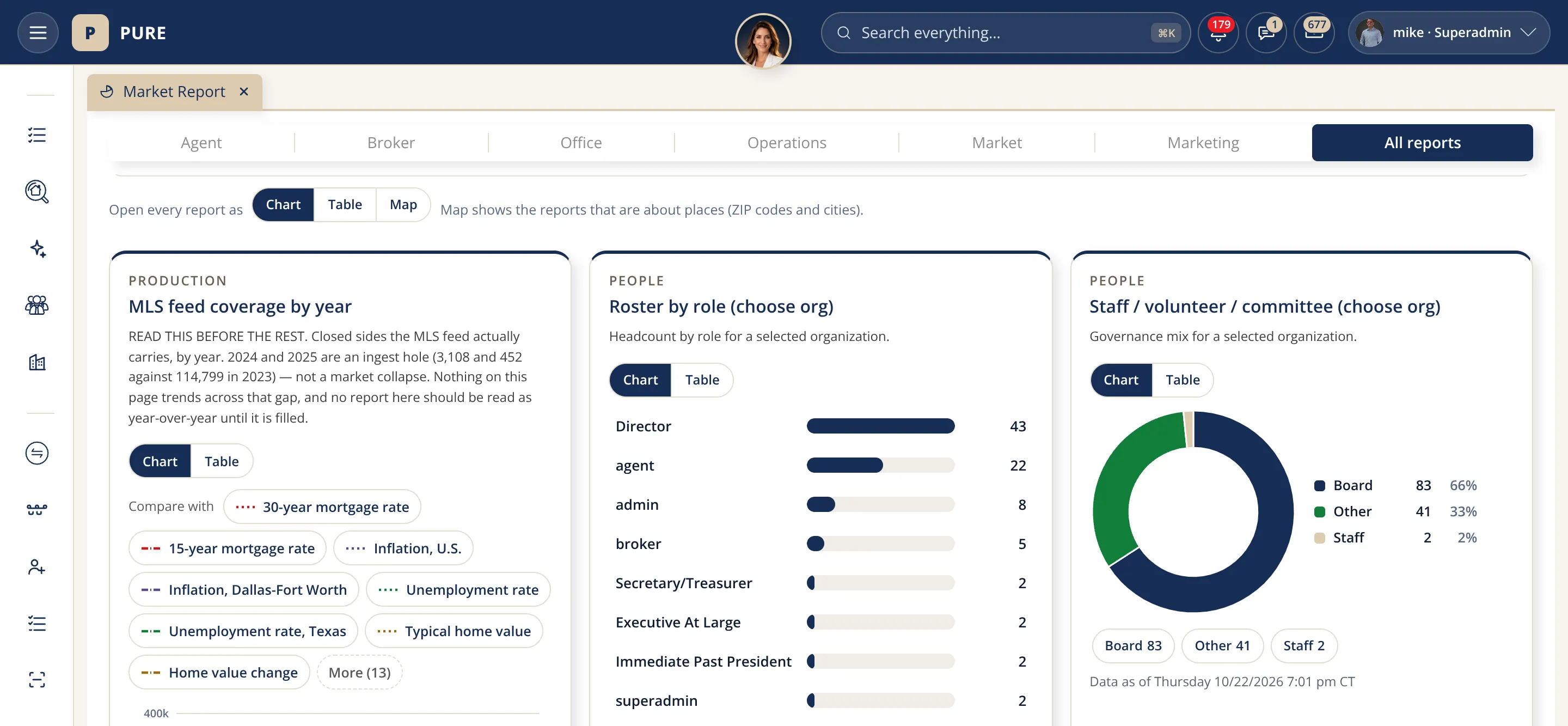
The All reports tab of the BI reports page with three report cards: MLS feed coverage by year as a bar chart, the roster by role and the staff, volunteer and committee counts as a donut chart.
Reports at a glance. Feed coverage by year, roster by role, staff and committee counts: each a chart and table.
The report library tab with a row of report cards, each with its number, a small sparkline chart and the date its data was last read.
Every report, fresh. Each report card shows its numbers, the chart behind them and when its data was last read.

Transactions: one home sale, from contract to closing

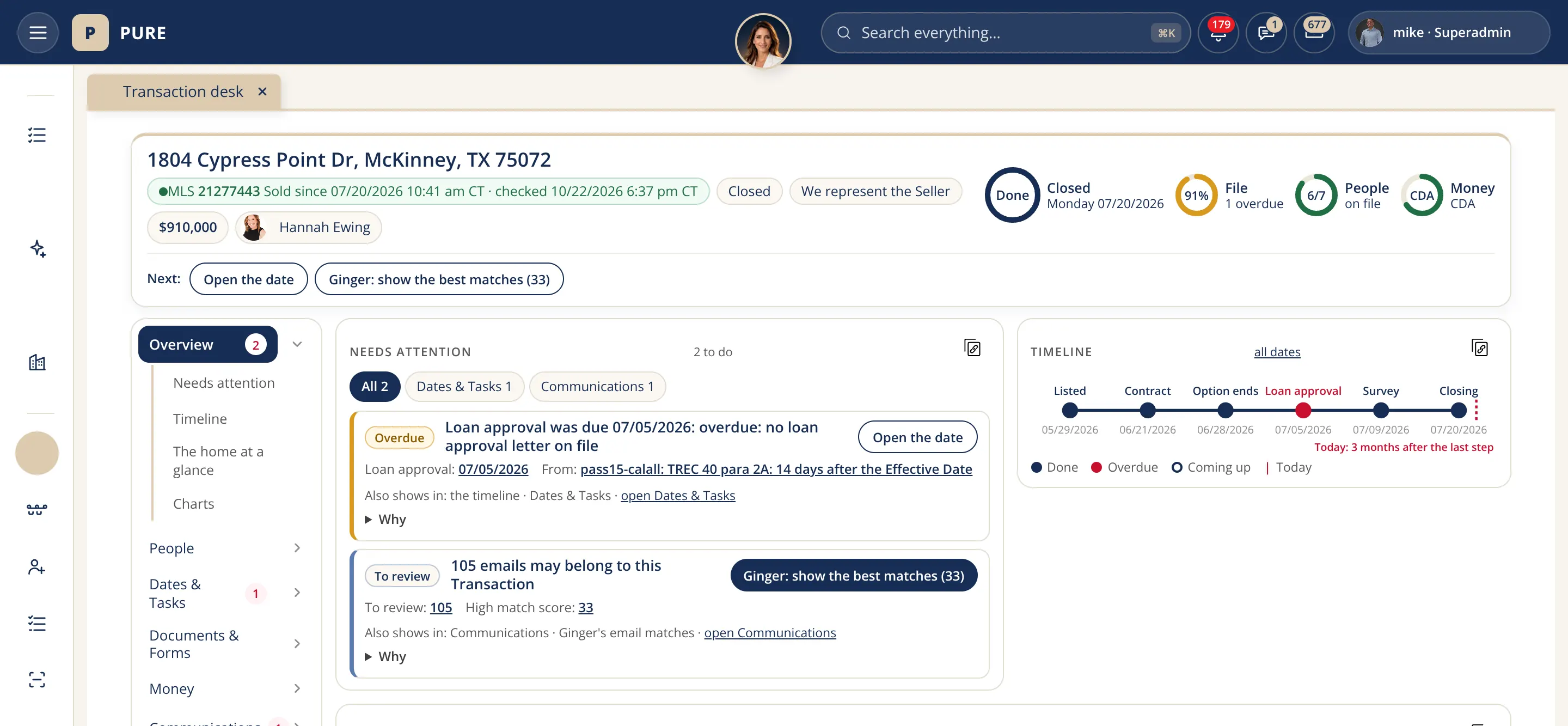
A Transaction page for a sample home in McKinney: the address and stage at the top, the overview tab with the attention list and next steps, and the files, people and money counts on the right.
One page per Transaction. The address, the stage, who represents whom, what needs attention next, the files and the money.
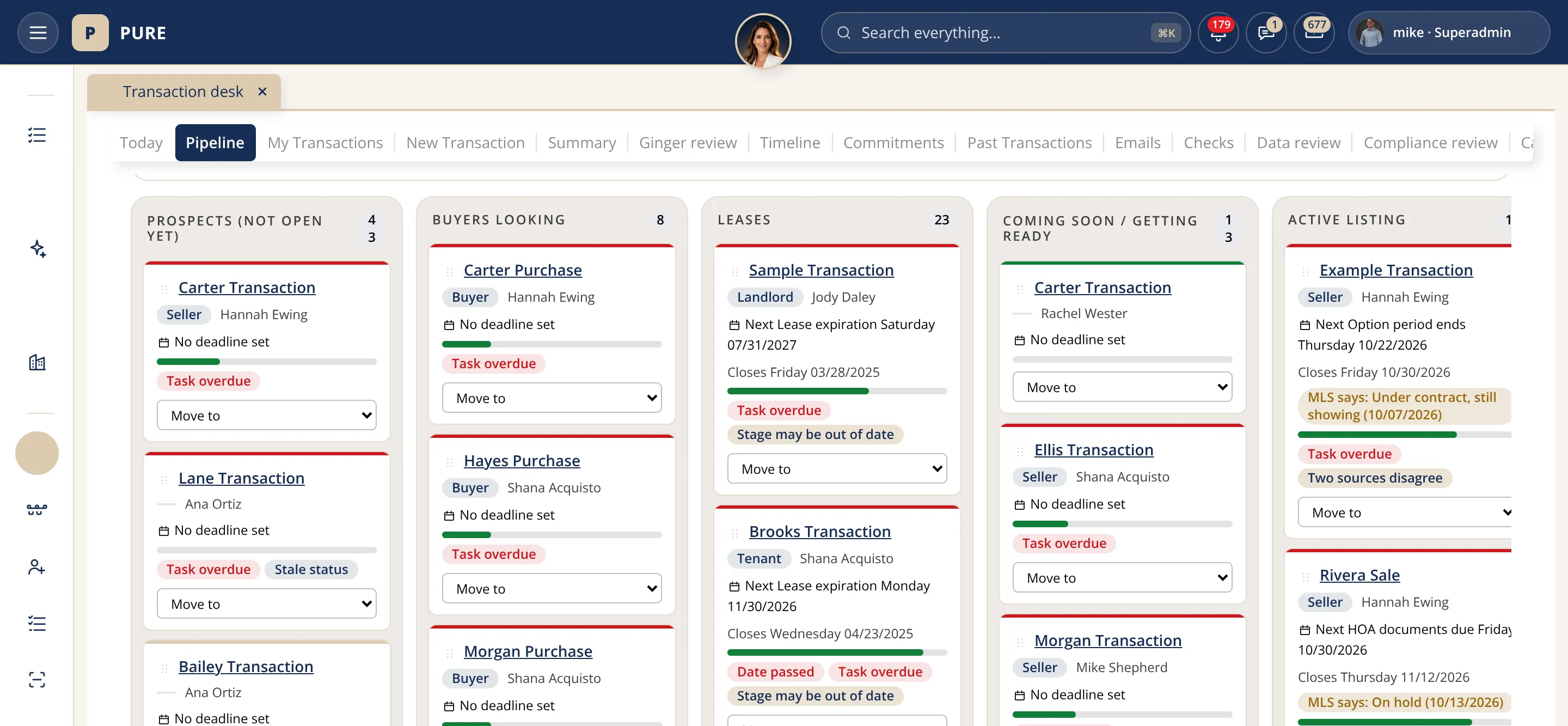
The Transaction desk's pipeline tab: columns for prospects, buyers looking, leases, coming soon and active listings, each holding sample Transaction cards with the client's role and the agent.
The pipeline board. Every open Transaction as a card in its stage, prospect to closing; each card opens its Transaction.
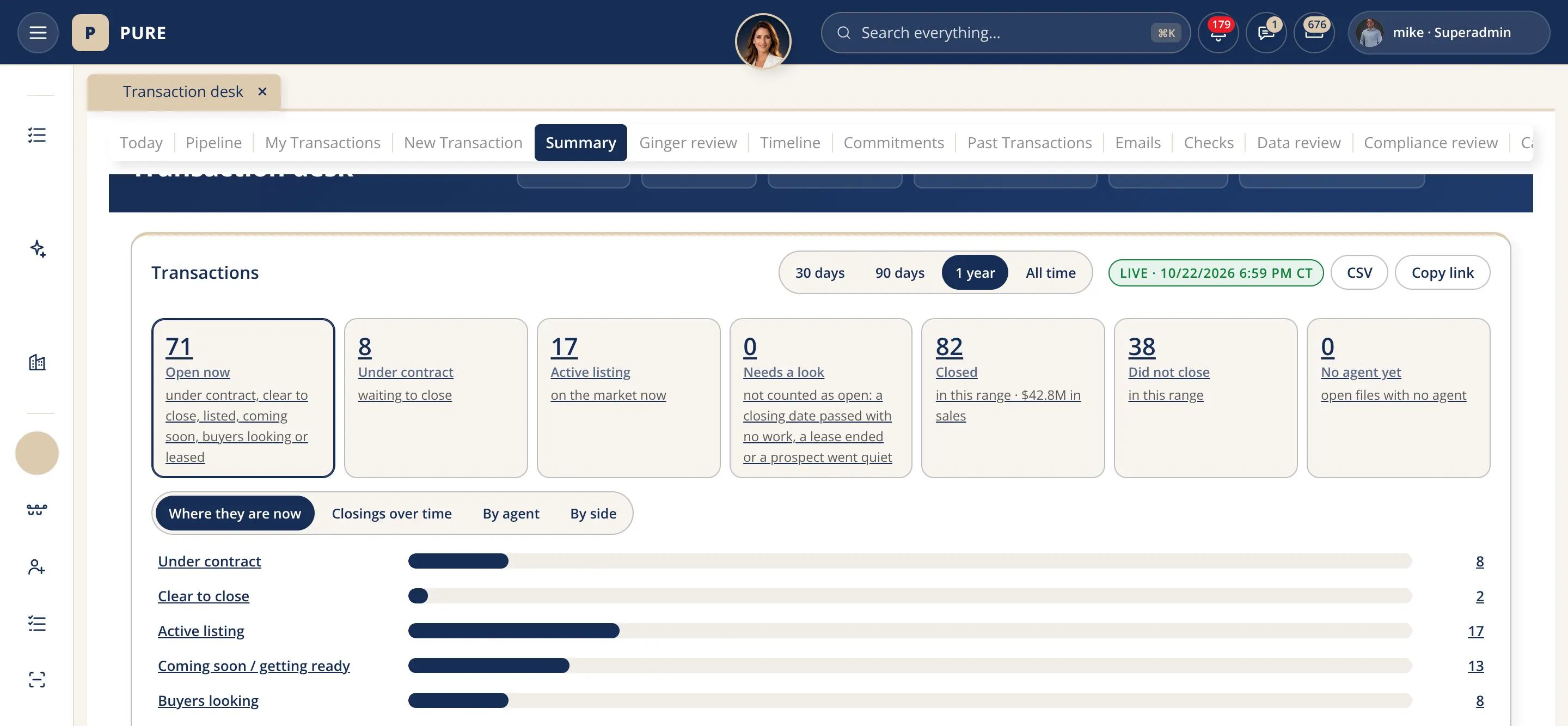
The Transaction desk's summary tab: counts of Transactions under contract, closing and waiting, with a horizontal bar chart of where they are now.
Where every Transaction stands. Open Transactions counted by stage, the list under each count, and Ginger's one-line summary.
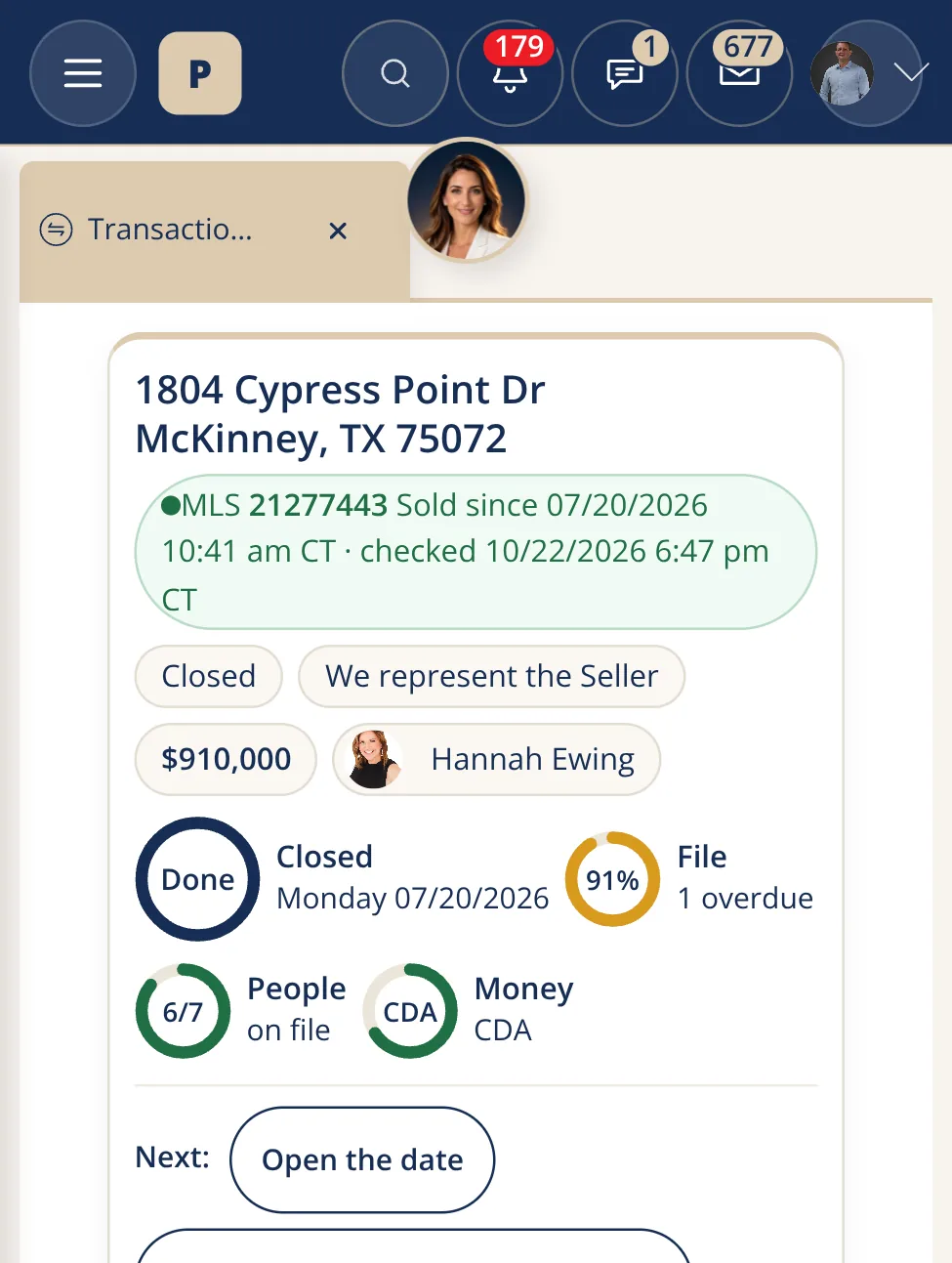
The same Transaction page on a phone, with the address, the stage and the next step stacked for a small screen.
On a phone. The same Transaction page: stage, next step and files, with buttons big enough for a thumb.

The brokerage office

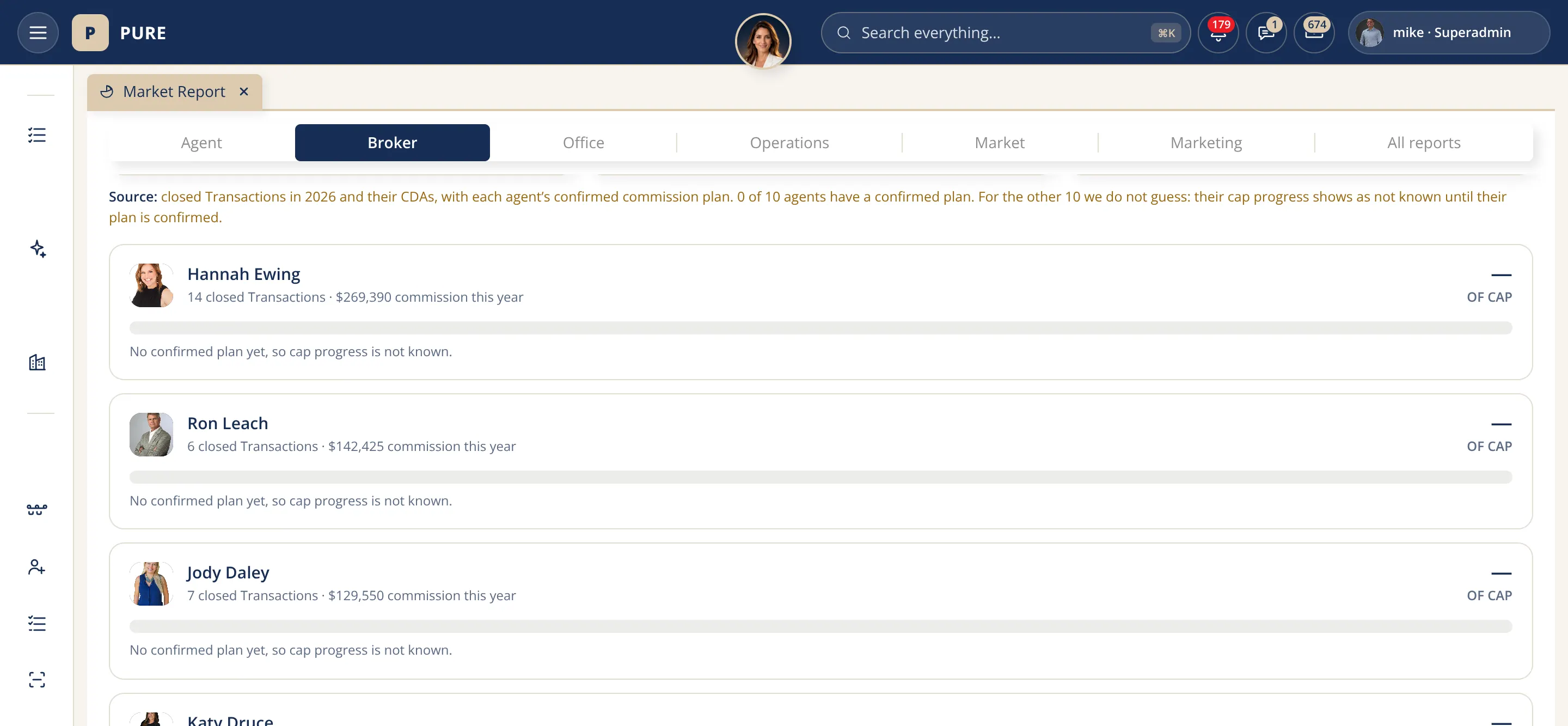
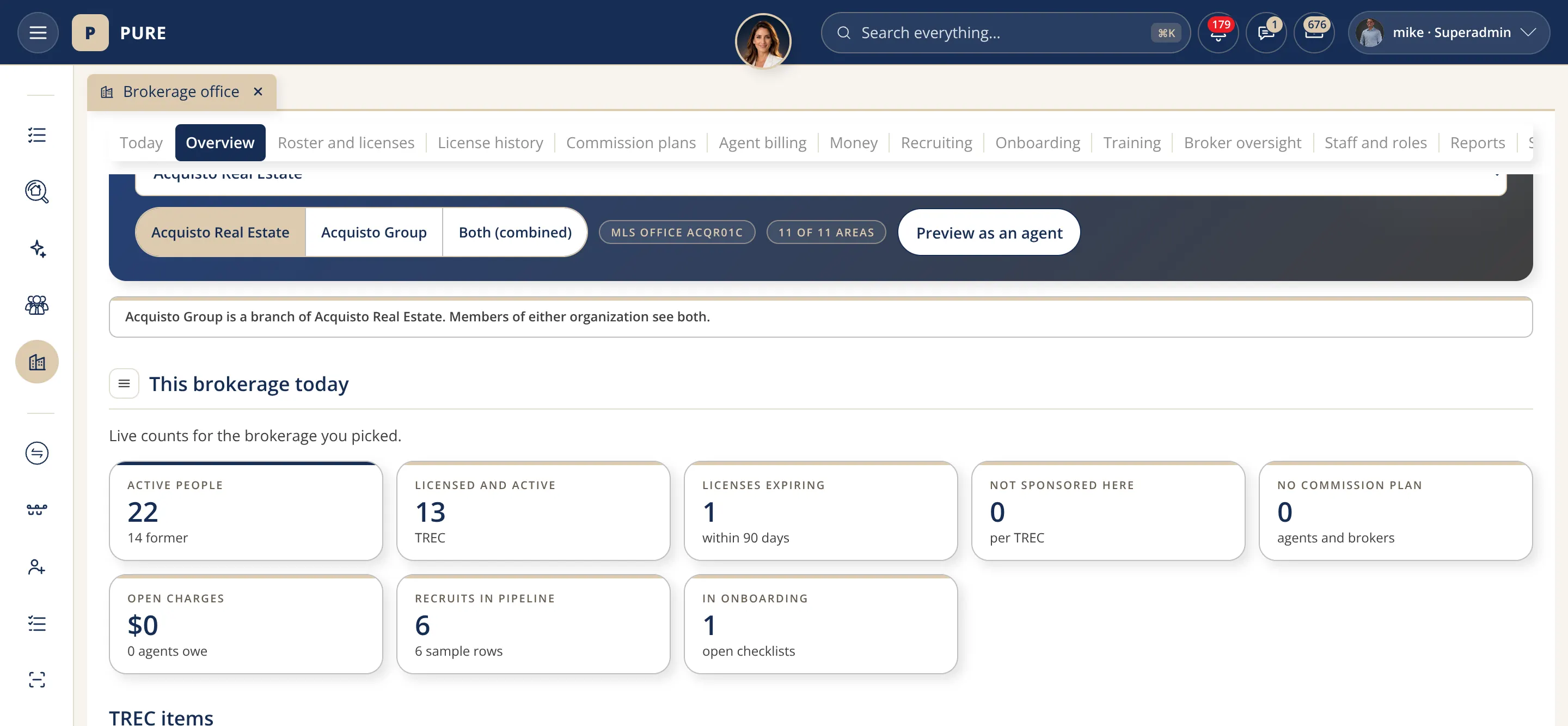
The Brokerage office page for Acquisto Real Estate: the organization picker, the This brokerage today heading and a row of live counts for agents, licenses expiring and sponsorship.
Your brokerage, today. Agents, expiring licenses, sponsorship, commission plans and onboarding for the organization you pick, read live.
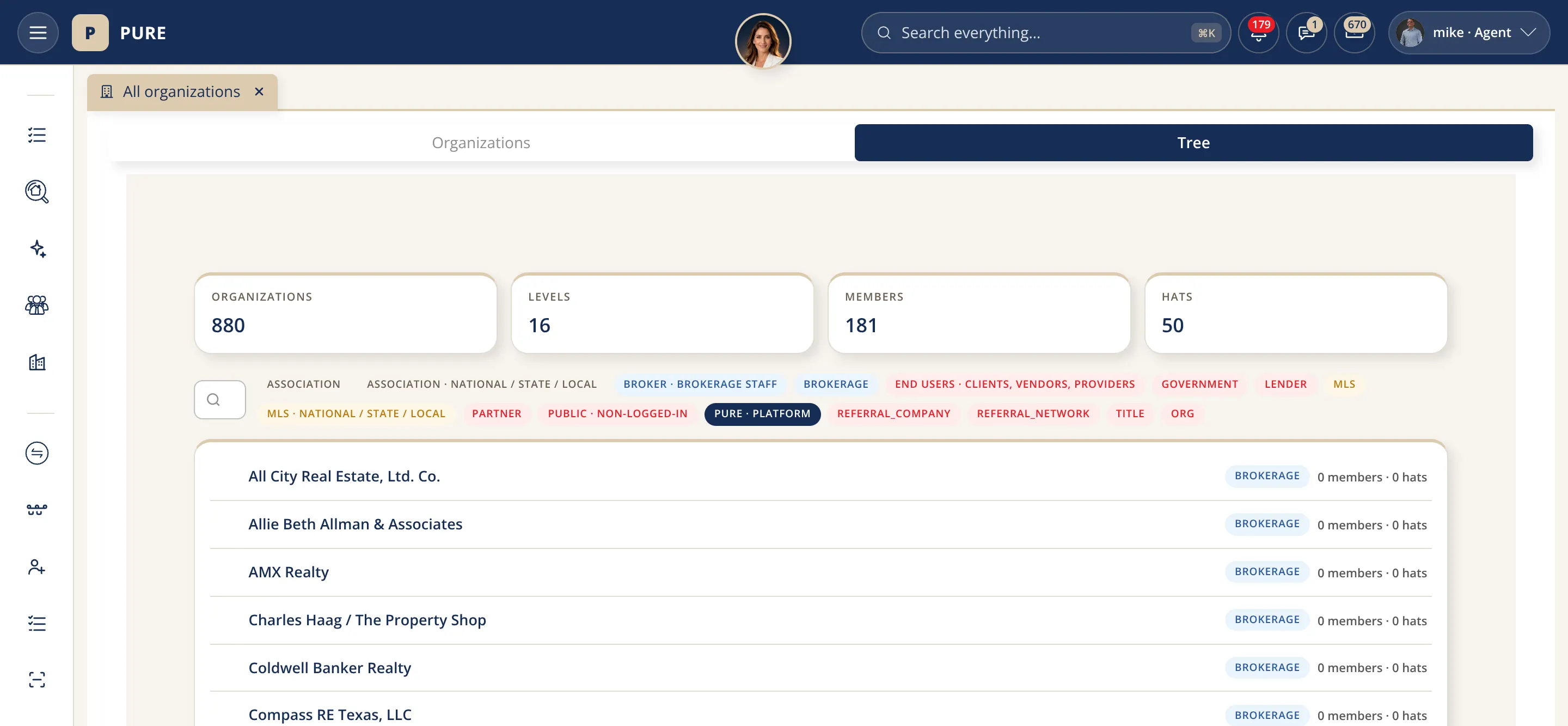
The Organizations page's tree view with counts of organizations, levels, members and hats at the top and the list of organizations with their levels under it.
Every organization, one tree. Brokerages, title companies, lenders, inspectors and associations with their levels, members and hats.
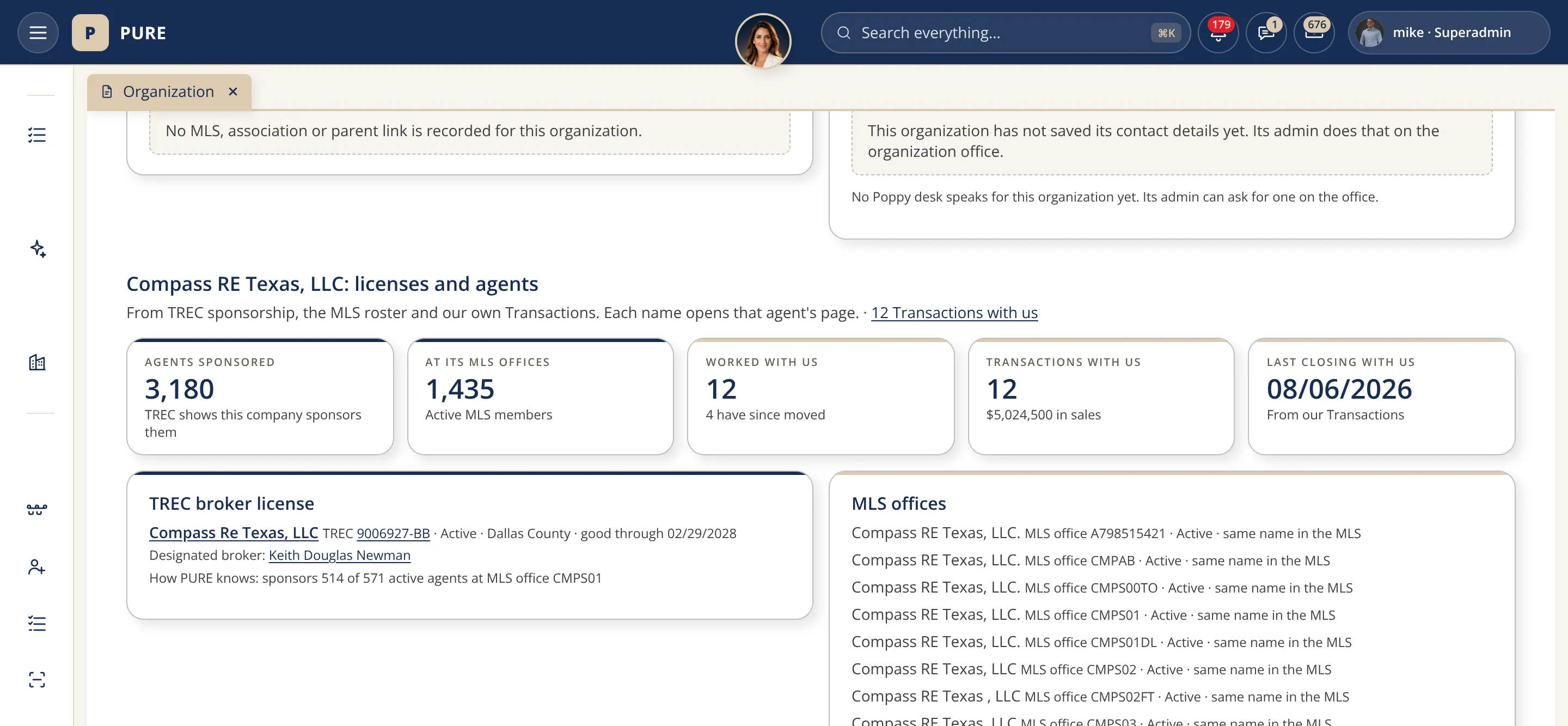
A brokerage page for Compass RE Texas: its TREC broker license, agent counts, MLS offices and the list of its agents.
Any brokerage's page. TREC license, MLS offices, agents and the Transactions closed with us, from public records and the roster.
The home search map on a phone, with the search bar at the top and listing cards under the map.
The map on a phone. The home search map with the same layers and listing cards, made for a thumb.

Also on this page, in words (the pictures live on each page):

Recently added

Recently added to PURE.

New this month, in plain words. Each one lives on its own page inside PURE.

See it working

Real screens from the running system.

Captured from PURE; each caption gives its date. The home search and property screens show real homes for sale from the live MLS feed, exactly as PURE shows them, with the listing brokerage and agent credited. The other screens use a demo account, so every person, Transaction and amount in them is a sample. Tap an image to see it full size.

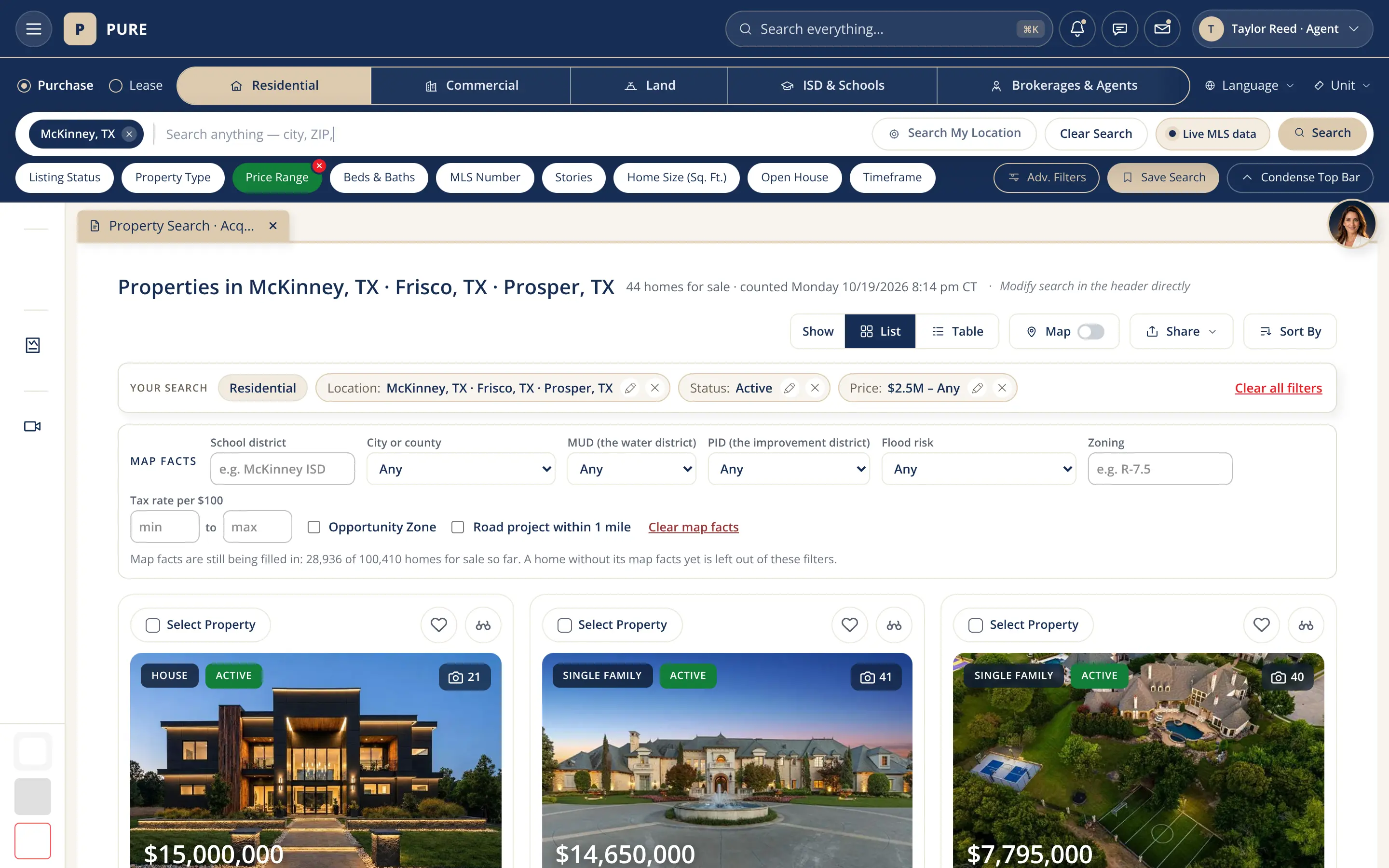
Home search in PURE: the navy search bar with Purchase or Lease, Residential, Commercial, Land, Schools and Agents, the chosen search (McKinney, Frisco and Prosper, active, 2.5 million dollars and up) and a gallery of 44 luxury homes for sale sorted by price, starting with a modern lit-up home at dusk, a stone château-style estate with a fountain and an aerial view of an estate with a pool and sport court, each card with its price, beds, baths, size, acres, price per square foot and year built.
Home search. One search bar sits at the top of every PURE page. Pick buy or lease, type a city, ZIP, address, MLS number or school district, and narrow by price, beds, size or open house. Results show as a gallery, a map or a table, and any search can be saved so new matches come to you. Real listings, captured 10/16/2026. Sign in to search
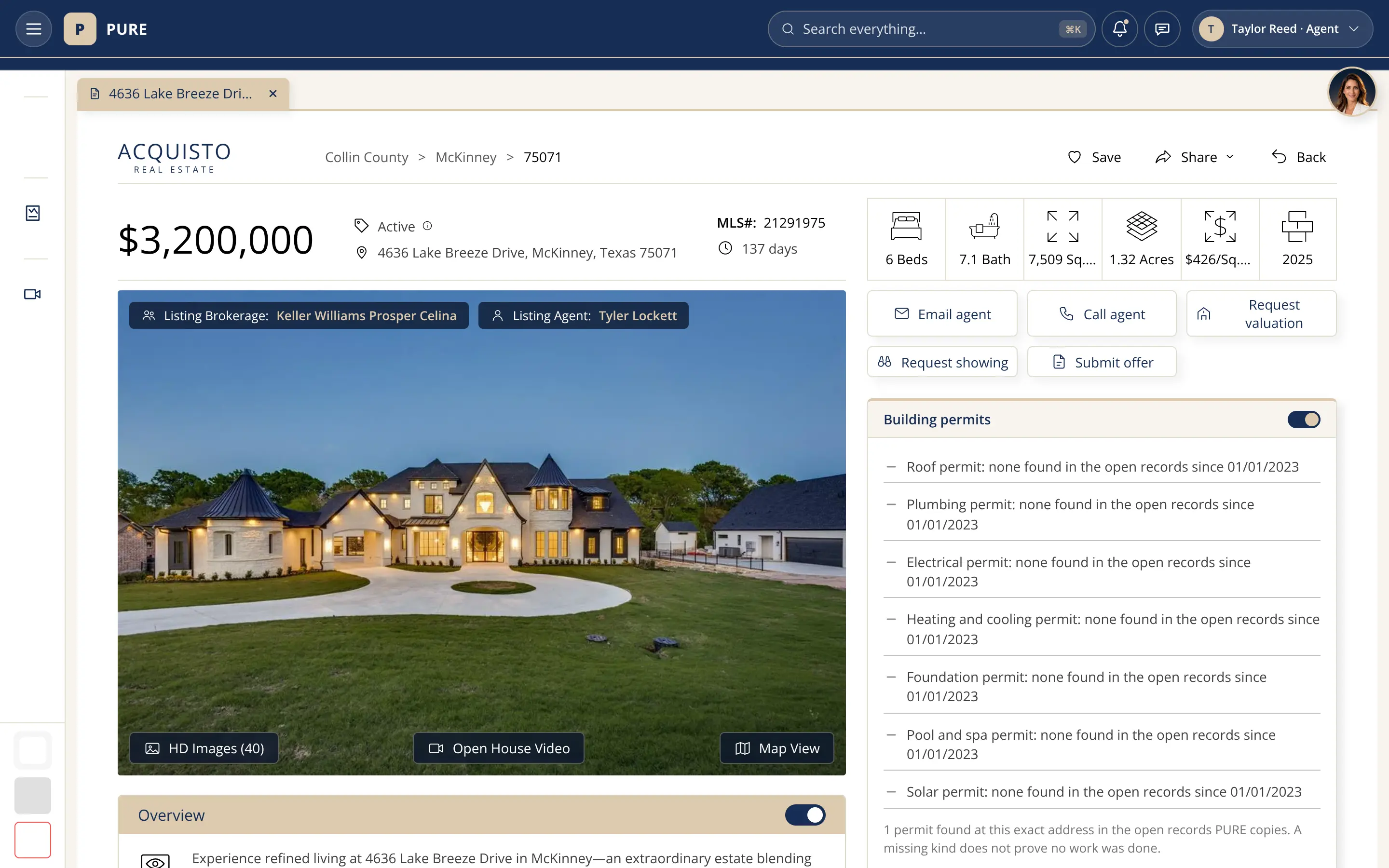
A property page in PURE for a luxury home for sale in McKinney: the price, status, address and MLS number, the key facts in icons (6 beds, 1.32 acres, built 2025), the listing brokerage and listing agent shown over a large twilight photo of the lit-up home, buttons to email or call the agent, request a showing, ask for a valuation or submit an offer, and the new Building permits card listing each kind of permit found in the open city records.
The property page. Every home gets one clean page: the key facts at a glance, the photos, and one-tap buttons to ask for a showing, a valuation or to start an offer. A real listing, captured 10/16/2026.
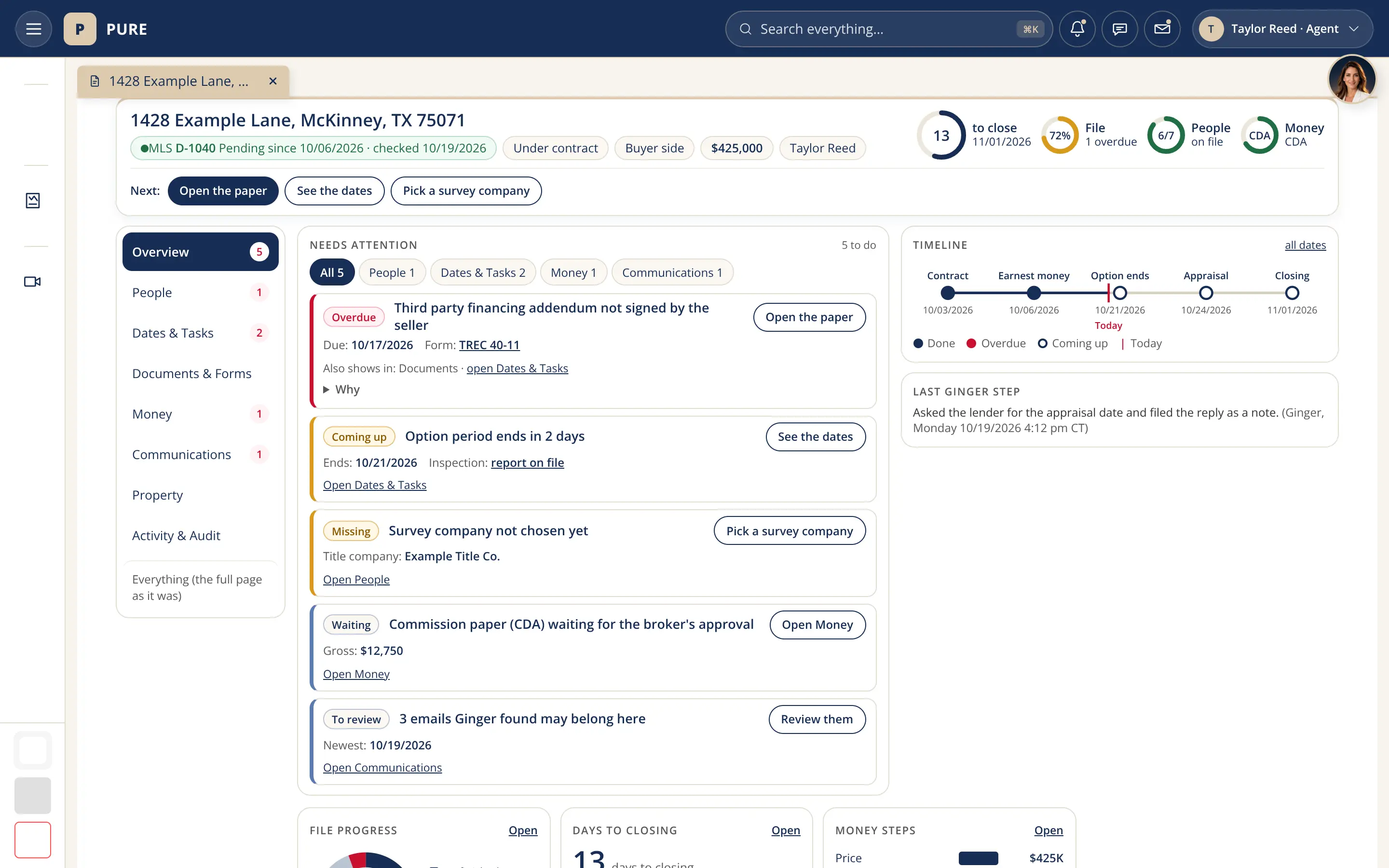
The one-screen Transaction page for a sample Transaction, 1428 Example Lane: a summary bar with the MLS status, Under contract, Buyer side, the price and the agent, four dials (13 days to close, the file 72% done, 6 of 7 people on file, the commission paper), Next buttons for the three most urgent steps, a left rail of sections with counts, a Needs attention list with one button each, a timeline from contract to closing with today marked, and Ginger’s last step.
One page per Transaction. A Transaction is the whole home sale, from signed contract to closing. Its page now fits on one screen: what needs attention, the next three steps, the key dates and who owns each one. This is a sample. Captured 10/19/2026.

Also on this page, in words (the pictures live on each page):

  • MLS details, in plain words. The full MLS record, grouped into cards with a short tip for each field.
  • One workbench per partner. Title, lender, inspector and every other partner see only their own Transactions, dates and papers.
  • The Pure Store. Every PURE app, add-on and service on one page, each marked available, included or coming soon.

Recently added

Recently added to PURE.

Real screens from PURE in a demo account, captured 10/15/2026 and 10/19/2026. Every person, Transaction and address in them is a sample. Tap an image to see it full size.

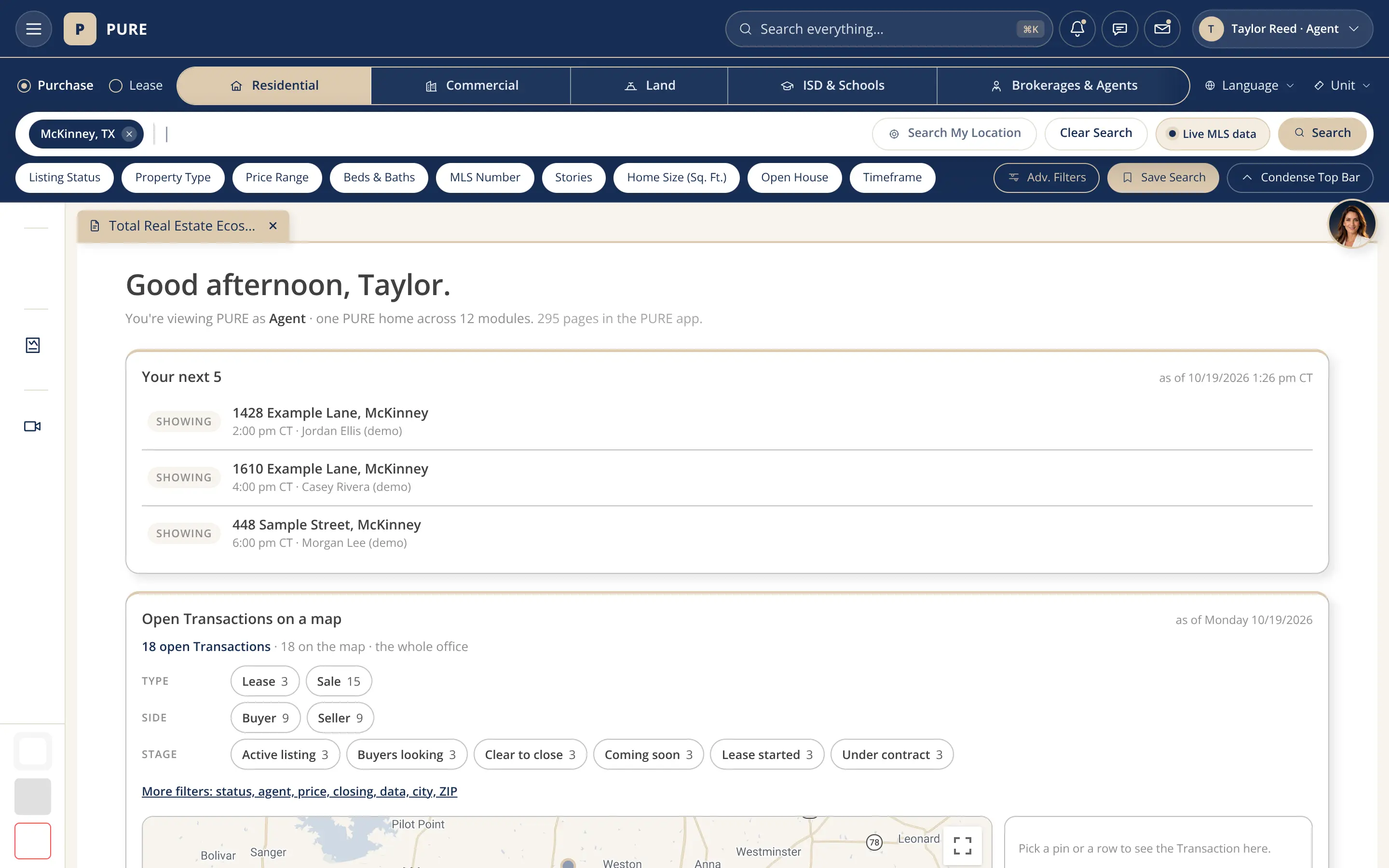
PURE home for a demo agent: Good afternoon, Taylor, then Your next 5 listing three sample showings for today with times and buyers, quick actions for New Listing, Upload Document and New CMA, and a card that says Poppy opens from her picture at the edge of the screen.
Your next 5. Your PURE home opens with the five things that need you next, soonest first: closings, overdue dates, showings today, new leads and unread messages. Each one opens its exact record. Sample data.
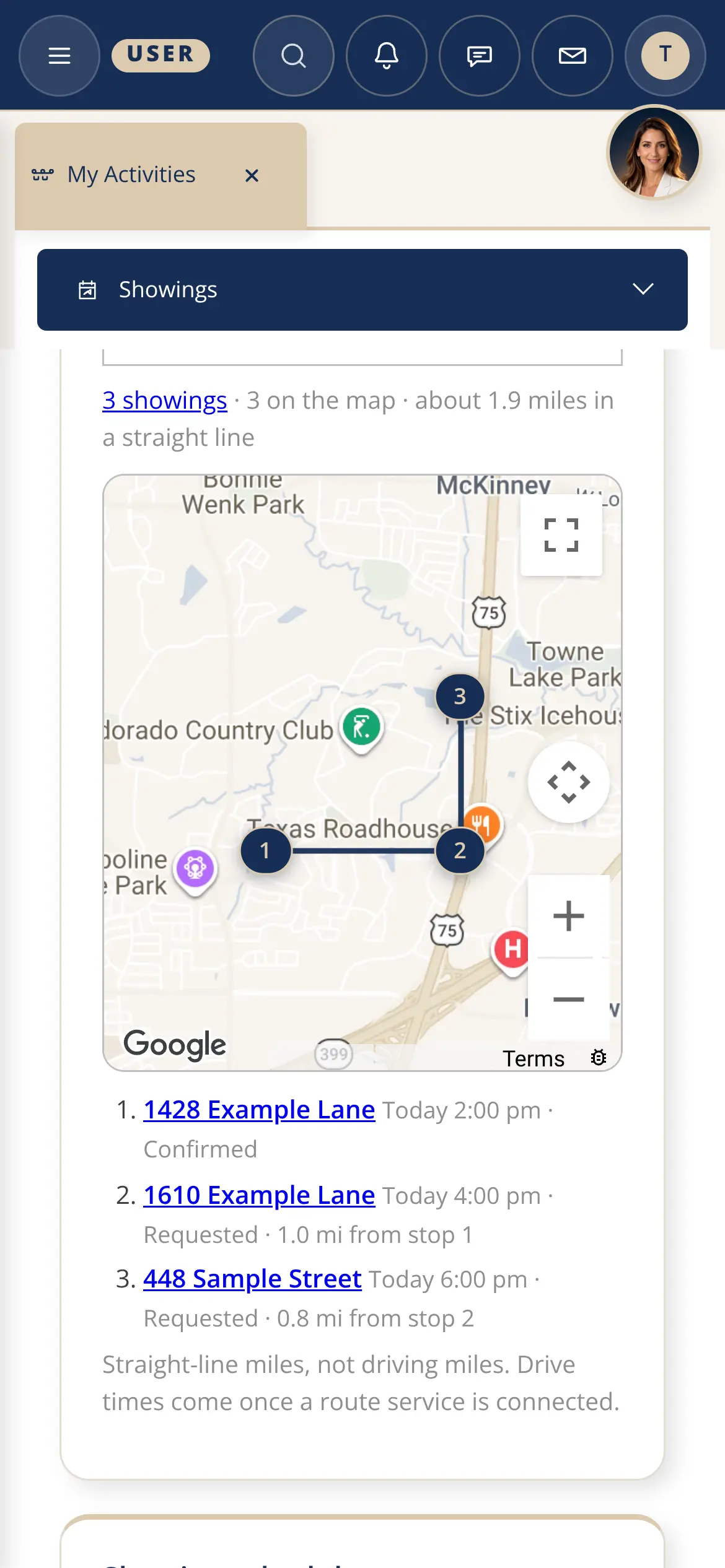
The Showings page on a phone: each showing is a card with the day, the home, the client, the agent and its status, such as Confirmed, with a Copy link button.
Made for a thumb. On a phone, tables turn into cards and buttons are big enough to tap. Here, today’s sample showings each sit on their own card.
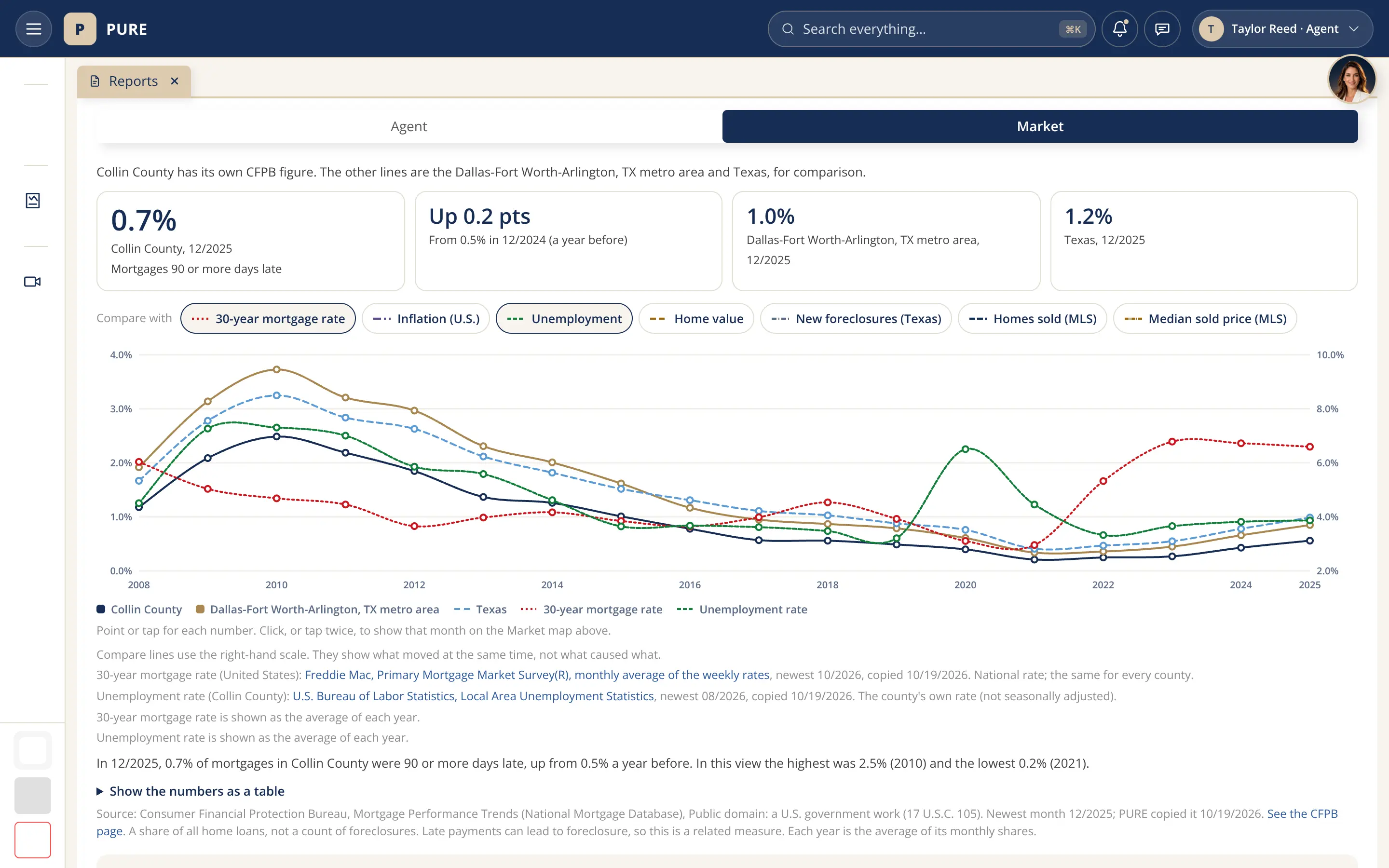
BI Reports, Market tab: late mortgages for Collin County, 0.7% of home loans 90 or more days late in 12/2025, beside the Dallas-Fort Worth metro area and Texas, a row of Compare with buttons (30-year mortgage rate, inflation, unemployment, home value, new foreclosures, homes sold and median sold price), and a chart from 2008 to 2025 with the mortgage rate and unemployment lines laid over it on a right-hand scale, each with its source.
Compare with. Lay mortgage rates, unemployment or home values over the late-mortgage chart to see what moved together.
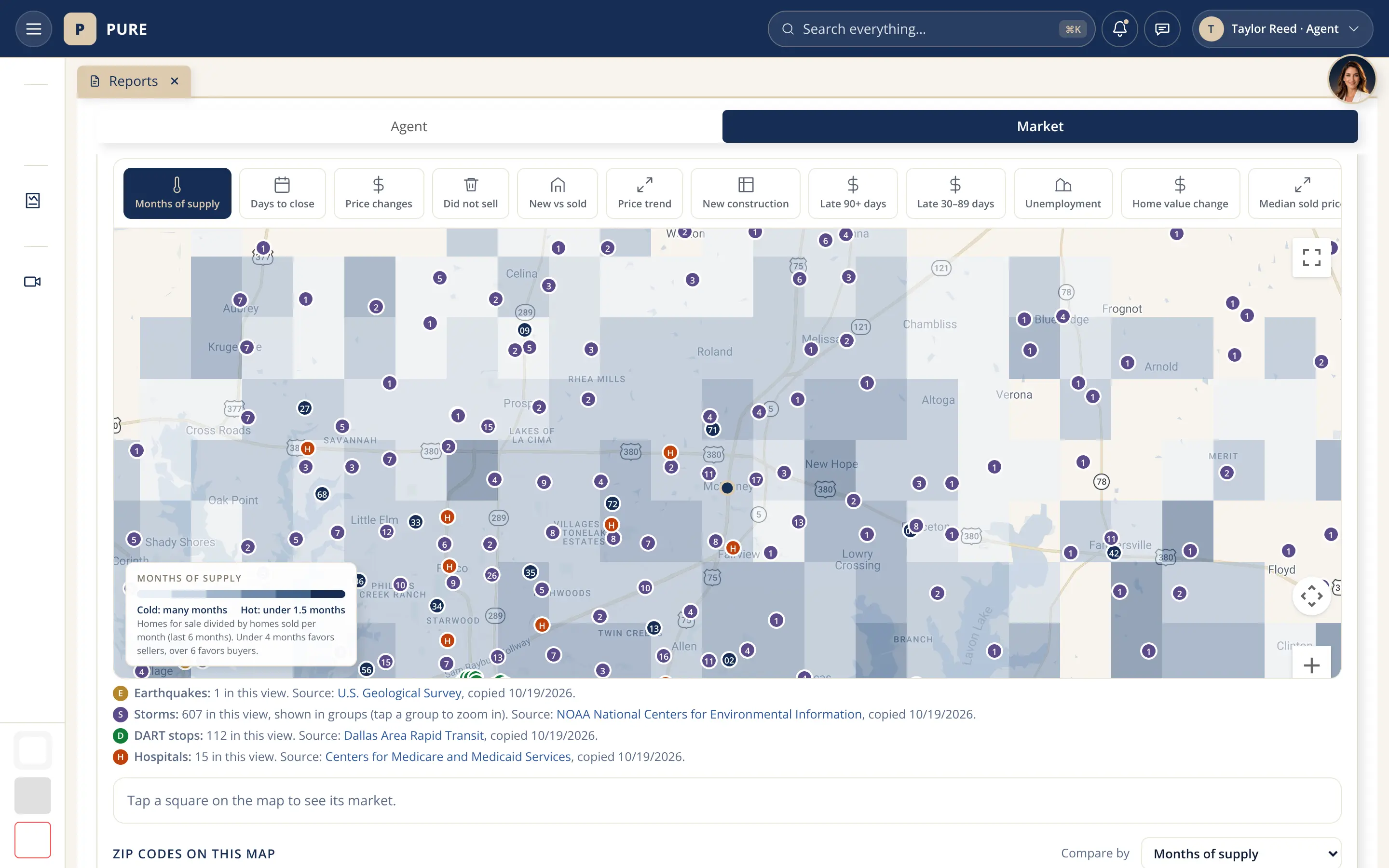
The Market map around McKinney with the months of supply squares and four point layers switched on: earthquakes, storms, DART stops and hospitals, each dot lettered, with a line under the map naming each layer’s count and public source.
Point layers. Storms, earthquakes, DART stops and hospitals on the Market map; each dot opens its record.

Also new, in plain words

  • One people directory. Staff, agents, partners and clients are filters on one list, instead of four separate pages.
  • One home for your documents. Every paper on every Transaction you are part of, grouped by Transaction, with its status and one Open button.
  • One document viewer. Open any filed paper in one place, see the exact line a date was read from, or open a file straight from your own device without uploading it.
  • One home for our design rules. Brand, icons, buttons, headers and the left menu live in one design library, so every page looks and works the same.

Also on this page, in words (the pictures live on each page):

  • A faster Transaction desk. Lists load as you open them, and Ginger sums up where things stand in one line.
  • Late mortgages by county. Each county shaded by its share of late home loans, with a month slider.
  • Property checks. Flood zone, special districts, HOA and taxes, each with a rating and its official source.
  • Then the deal fills the blanks. When you prepare a form, each field shows where its value came from.

Forms and signatures

Forms, signatures, and how they map.

A form is not a picture of a page. Every box on it is tied to a field on the Transaction, so PURE fills the blanks from the record and sends the signers a link. Real screens below, captured 09/30/2026 from a sample Transaction; every value is a sample.

How a form becomes a signed contract Four steps left to right: a form from the library, its mapped fields, the Transaction data that fills them, and the signature link sent to each signer. 1 · FORMThe forms library165 on file 2 · MAPField to field31 forms have a map 3 · TRANSACTION DATAFilled from the Transactioneach value shows its source 4 · SIGNA link per signera sealed record 1 · FORMThe forms library165 on file2 · MAPField to field31 forms have a map3 · TRANSACTION DATAFilled from the Transactioneach value shows its source4 · SIGNA link per signera sealed record
The path a form takes in PURE, left to right.
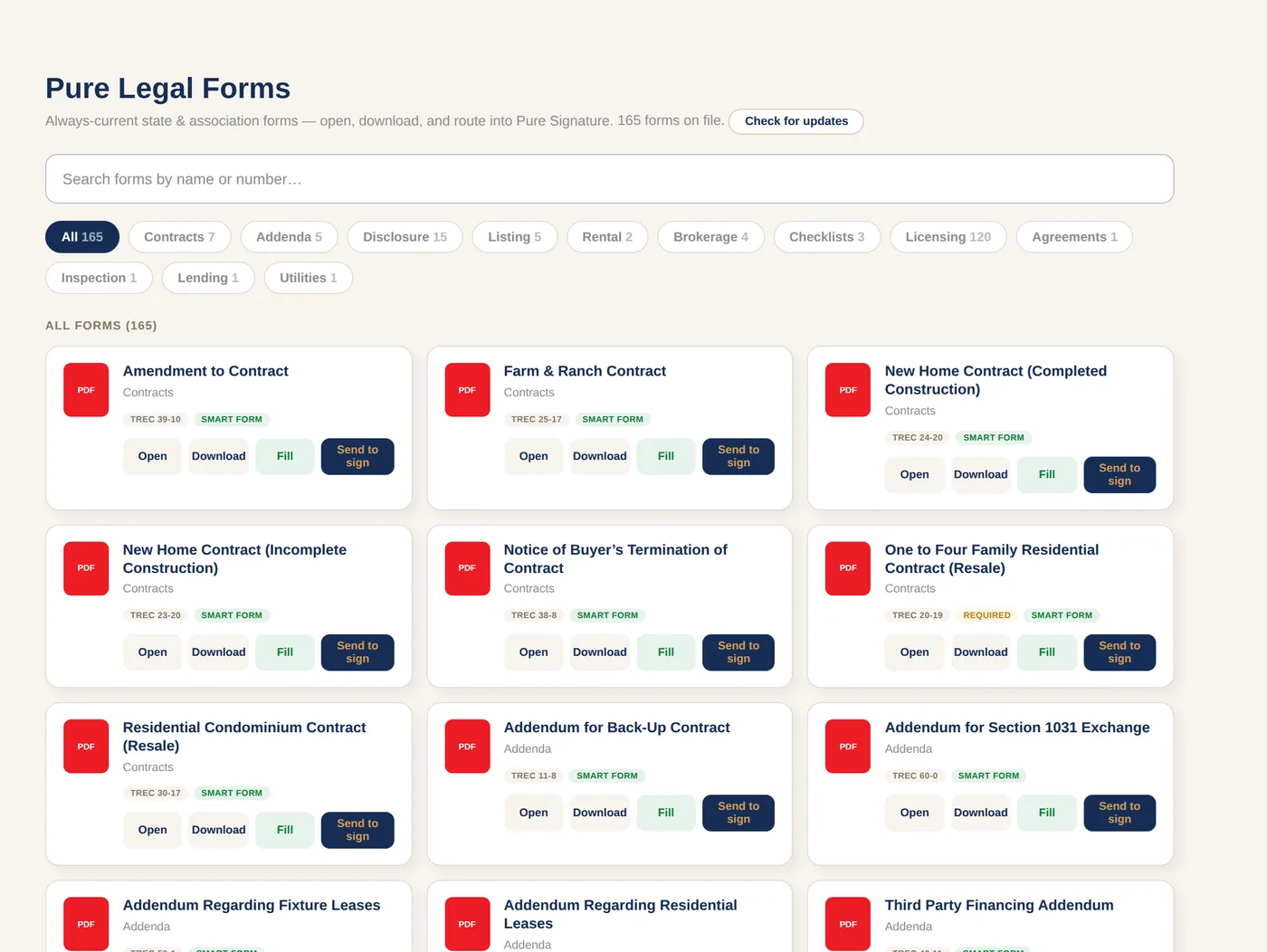
Step 1 Pure Legal Forms: a search box and category filters over cards for TREC contracts and addenda, each with Open, Download, Fill and Send to sign buttons. The page says 165 forms on file.
The forms library. 165 forms are on file, from TREC (the Texas Real Estate Commission) contracts and addenda to licensing paperwork. Each can be opened or downloaded, and a form with a field map is marked Smart form once its fields are keyed. 31 forms have a field map today; the AI Forms Repo lists which are mapped and which are not yet. Forms library (sign in) · AI Forms Repo (sign in)
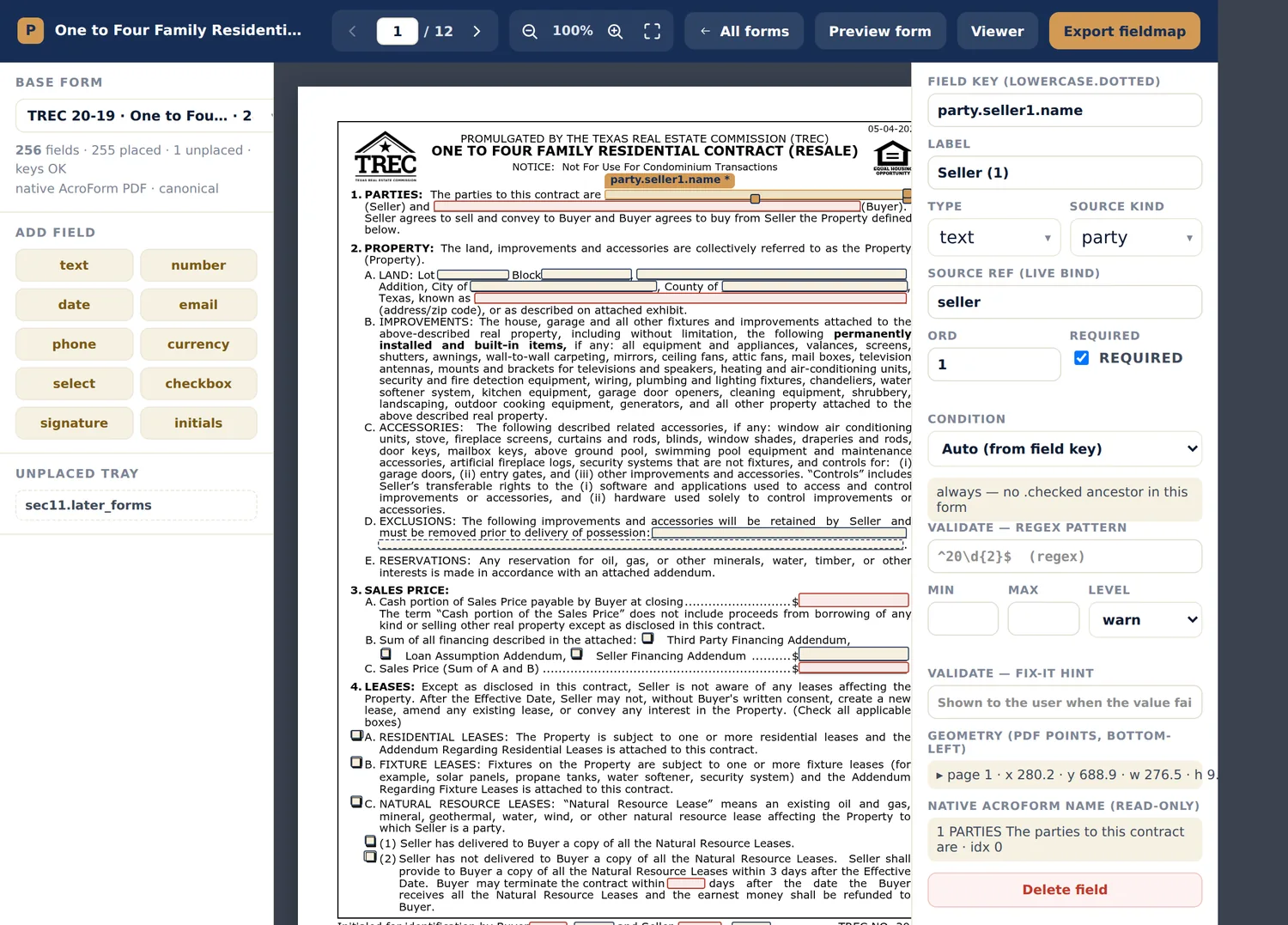
Step 2 The form designer open on the TREC one-to-four family resale contract. The Seller box on page 1 is selected; the panel on the right shows field key party.seller1.name, source kind party and source ref seller.
Every box knows where its answer comes from. In the form designer, each box on the blank form is tied to one fact in PURE. Here the Seller box on page 1 of the resale contract is filled from the person marked as the seller. Answers can come from a person, the listing, the transaction, the agent, the office or the broker. Form designer (sign in)
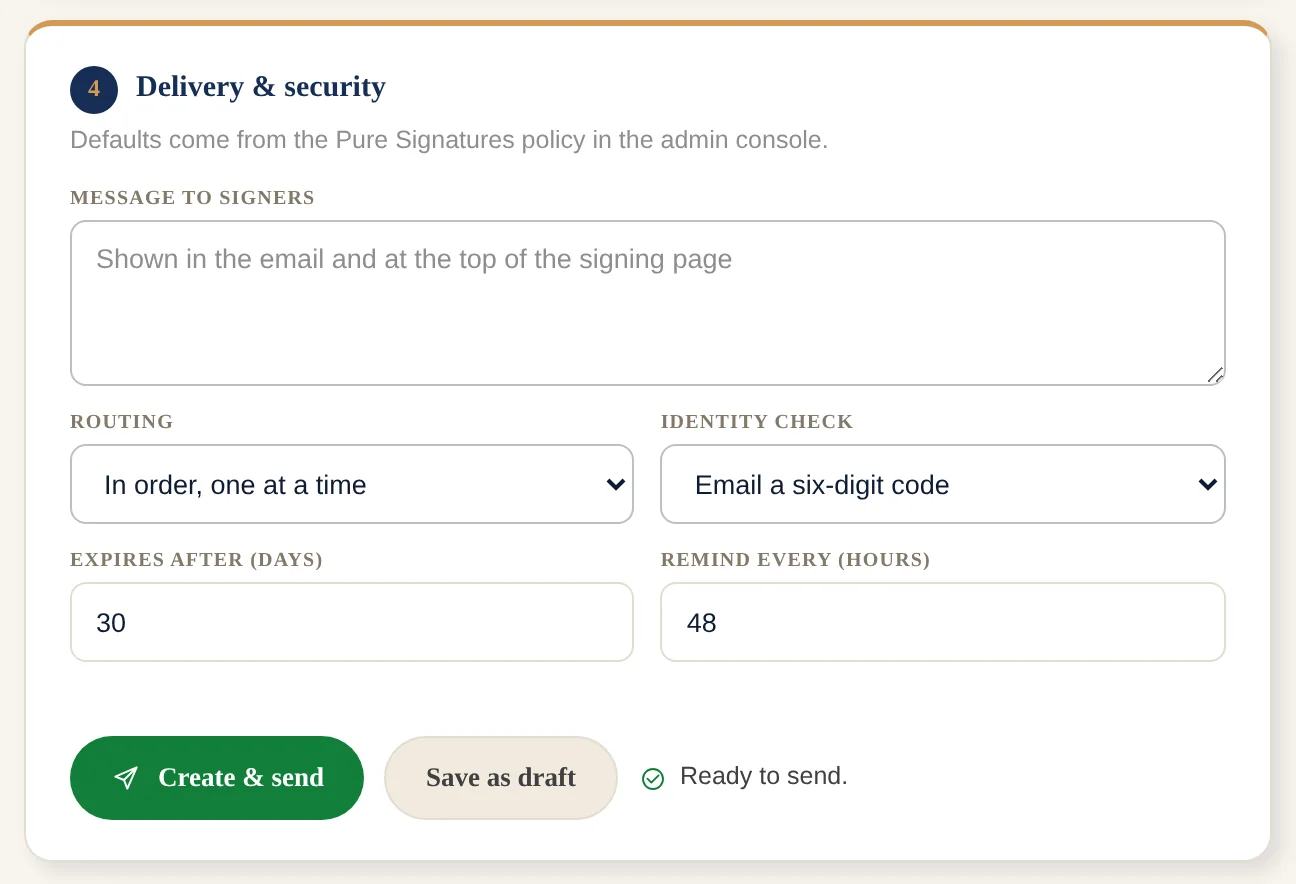
Step 3 The Delivery and security card of Prepare for signature: message to signers, routing in order one at a time, identity check by a six-digit email code, expires after 30 days, remind every 48 hours, and Create and send.
Signatures. Each signer is tied to their own initials and signature boxes on the form. By default they sign in order, one at a time, and the next is emailed when the one before finishes. You can send to all at once instead. Each signer gets a personal link and confirms with a six-digit code sent by email. Links expire after 30 days and reminders go out every 48 hours, by default. Every action is logged in a tamper-evident chain, and a finished envelope can be sealed and given a certificate of completion. Pure Signatures (sign in) · Envelopes (sign in)
Five fields from the TREC resale contract (20-19) and where PURE fills them from
On the contractFilled fromSource
Paragraph 1, Sellerthe seller party on the TransactionParty
Paragraph 2A, property addressthe listing addressListing
Paragraph 3A, cash portionthe Transaction’s cash portionTransaction
Paragraph 3B, sum of all financingthe Transaction’s financed amountTransaction
Paragraph 5A, escrow agent (the neutral company that holds the money and papers until closing)the Transaction recordTransaction record

What works today: forms, field maps, filling from a Transaction, and sending for signature all run in PURE for signed-in staff. Nothing on this page sends anything. Only 31 of the 165 forms have a field map so far.

Meet Poppy and Ginger

Meet Poppy and Ginger.

Two AI assistants, one team. Poppy runs PURE; Ginger answers the phone, email and website for Acquisto Real Estate.

Poppy, Ginger, the Association Desk, the MLS Desk and the Lender Desk together on a Dallas rooftop at blue hour: a frame from the PURE Overview with AI assistants. PURE Overview with AI assistantsLuxury home search, clients, contracts and signing, and the desks that report back to you

Remembers

The Transaction, the people and every meeting, in one place.

Acts

Sends the texts, drafts the flyers and books the schedule.

Asks first

Money, signatures and anything sent outside PURE always wait for your yes.

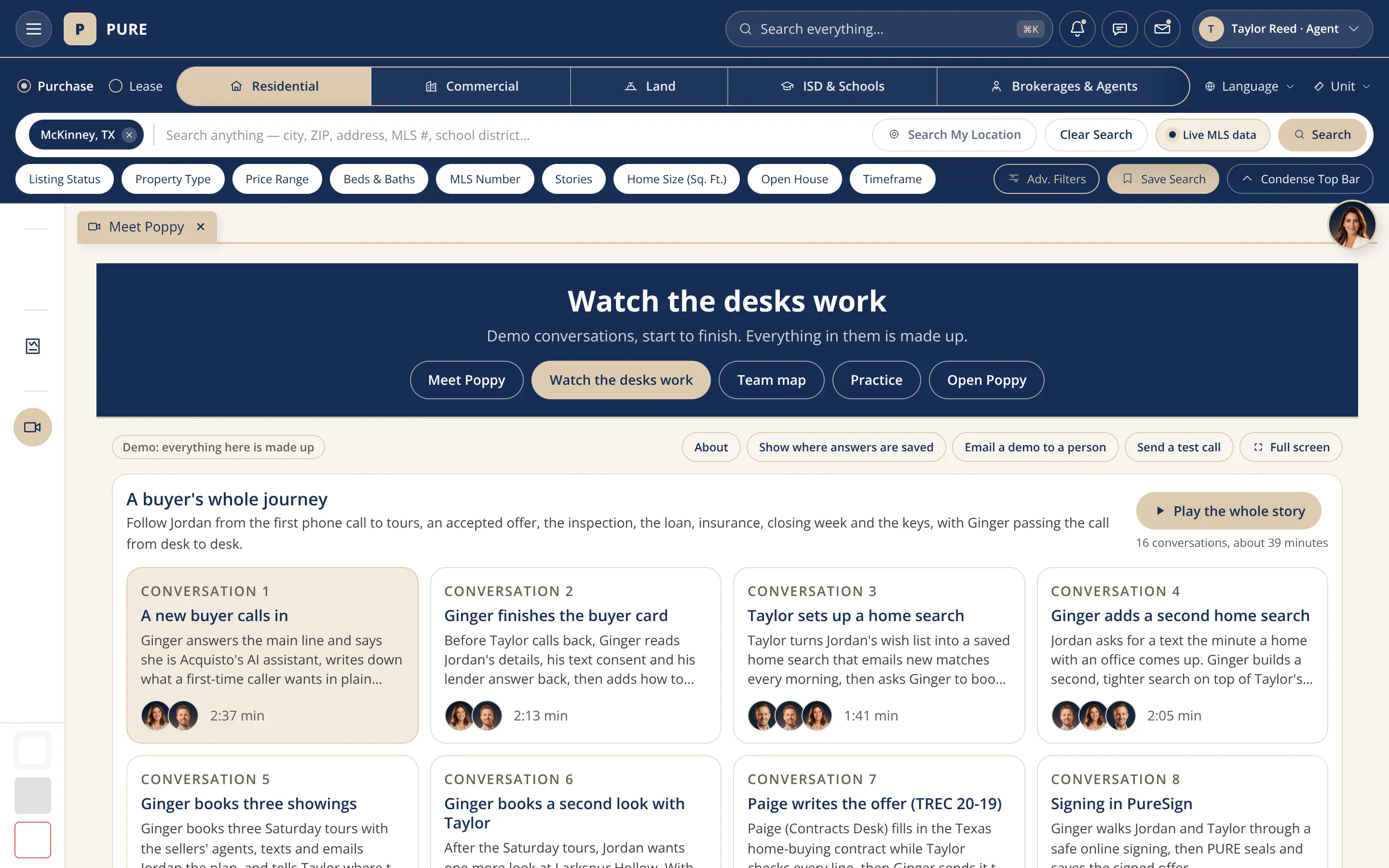
Watch the desks work: the story A buyer’s whole journey with a Play the whole story button and cards for each demo conversation, such as A new buyer calls in, Ginger finishes the buyer card, Taylor sets up a home search and Paige writes the offer, each with the faces on the call and its length.
Watch the desks work. Demo conversations that follow one made-up home buyer from the first phone call through tours, the offer, the inspection, the loan, insurance, closing week and the keys. Ginger answers the main line and hands the call to the right desk, so the buyer never repeats a thing. Everything in it is made up. Captured 10/15/2026. Sign in to watch
Do it with Ginger Live

Ginger takes the routine off your team.

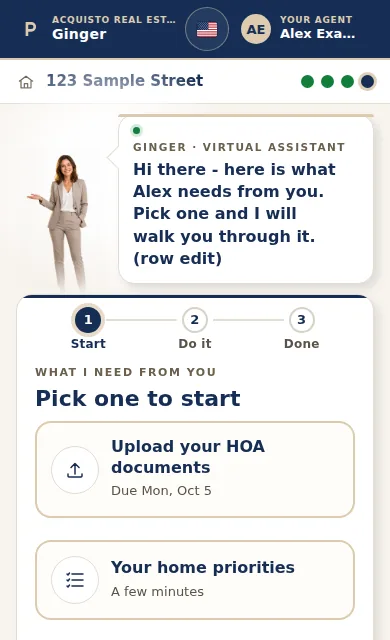
Ginger walks each client through the one task they need to do next, in a simple room on their phone, and can join them live when they want help.

The one-task room on a phone: Ginger speaks in a bubble and the client picks between uploading their HOA documents or answering a few questions.
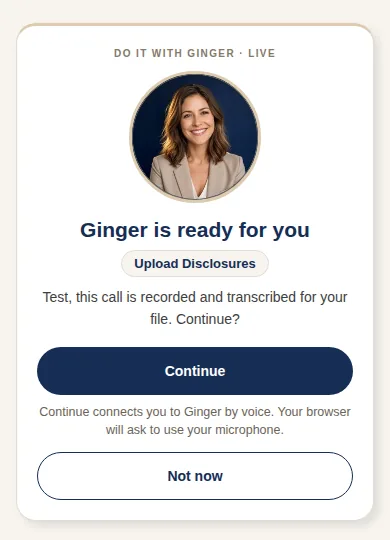
The Do it with Ginger Live consent card: Ginger is ready for you, with Continue and Not now buttons.

These two screens use a sample person and a sample address. Captured 09/30/2026.

Also on this page, in words (the pictures live on each page):

Connected apps

Bring the apps you already use into PURE.

A real screen from PURE, captured 10/04/2026. No client or account details are shown.

Also on this page, in words (the pictures live on each page):

Why PURE

Your agents juggle a dozen logins and retype the same information all day. PURE makes it one.

Everything below is one connected ecosystem with one login — not a bundle of separate tools. Tap any card to see the real screen.

Search & MLS

Listings, tax records, comps and marketing — enter a listing once and it goes everywhere it should.

The Transaction Hub

Contracts, signatures, deadlines and every person in the Transaction — one place, and everyone sees only what they should.

Money that adds up

Commissions, closing paperwork, statements and dues — every dollar tracked from contract to your books, automatically.

Compliance built in

Checklists, disclosures and required paperwork follow every file on their own — no binder, no chasing.

An AI assistant

Poppy drafts documents, files paperwork, and chases signatures for you — real work done, not just suggestions.

You stay in control

Your broker or admin can turn features on or off, set who sees what, and shape the ecosystem — no tech team required.

Who it's for

Everyone in the Transaction gets their own workspace — all working the same file.

Sign in and PURE knows who you are. The agent's contract, the lender's application, the inspector's report and the title company's closing file are all one Transaction — everyone sees their side of it. Tap any role to preview its workspace.

Agents & brokeragesCRM, Transactions, commissions, compliance
AssociationsMembers, dues, events, governance
MLSsListing input, rules, feeds, participants
LendersLoans, applications, disclosures, docs
Title & escrowTitle work, payoffs, the closing table
InspectorsInspections, photos, reports
AppraisersComps, adjustments, final value
ContractorsJobs, quotes, crews, invoices
Buyers & sellersClients follow their Transaction and pitch in

It's all connected

The connections are what make it great.

One Transaction touches ten hands — in PURE they all work the same record. Flip the views to see the connections from every chair — or click any piece: entities jump to their own view, everything else opens an illustration with sample data.

Work flowing in — listings, people, paperworkWork flowing out — orders, reports, money

Best data in, best data out

Every document finds its home — however it arrives.

Meet people where they are: email it, text or SMS it in, drag it in, or let the client drop it from their phone. PURE reads it, names it by the standard, and files it where it belongs. Click any piece for an illustration (sample data).

Point at or tab to any piece to trace its path to the center. Tap it or press Enter to open its card.

Documents coming in — any door worksFiled & flowing out — Transaction, vault, books

One login, not sixteen

Today an agent juggles 16 separate apps. PURE is one.

A North Texas agent can juggle a stack of logins — and when a listing changes in one, the others go stale. PURE maps all 18 NTREIS MLS functions onto one record and one login for 14 member boards, and adds two more of its own, open houses and offers: 20 in all. Click any function to see what you use for it today — and where it lives in PURE now.

Today16 apps, 16 logins

…plus 6 link-out sites — HOA.texas.gov · Great Schools · New Home Source · Builder Update · Rate Plug · RETechnology. Every one a separate window. Associations run their own stack of about 10 more systems.

one record
With PUREOne login. Everything.
Included with PURE9
In the PURE Store9

Those 18 NTREIS functions, counted one way: 14 live now · 4 in progress · 0 missing. All 14 boards, Abilene Texoma.

All 20: the 18 NTREIS functions plus open houses and offers, in four groups. Tap any one to compare

From the NTREIS function crosswalk (SupportDoc NTREIS1 to NTREIS2): 18 functions, 14 member boards. Open houses and offers are PURE adds beyond that list. Live or in-progress status is PURE’s own count.

How it works

Three steps, and the retyping is gone.

The ecosystem already knows who you are, what you're allowed to see, and where your work lives.

1

Sign in once

One account with real security — fingerprint or face sign-in, authenticator codes, and easy recovery from day one.

2

PURE knows your role

Agent, broker, association staff, lender, inspector — the same door takes each person to their own home base.

3

Everything's already connected

Enter a listing once and it shows up in the Transaction, the commission paperwork, the books, and the feed — no exports, no retyping.

See PURE for yourself

Take the tour with no account, or sign in and work in the real thing.

The tour is open to everyone. Signing in takes you to your own workspace.